Tow truck receipt template in professional invoice style with itemized charges, tax, barcode, and QR code
Tow Truck Receipt Maker
Fill in the job on the left and the receipt updates on the right, ready to print or save as PDF.
Rates and tax shown are sample values you can change.
What Is a Tow Truck Receipt and How Do You Make One Online?

A tow truck receipt is a written statement of payment that lists the services rendered, the vehicle information, and the total amount the customer was charged.
This page puts that statement into a short online form. You fill in the job, and a live preview shows the receipt as you type. In my experience, the reason for towing is the line people skip most often, yet it explains every charge below it.
A hookup fee usually opens the list of costs, and an authorized signature closes the receipt. With the tool you can create one quickly, with no account and no watermark. The finished receipt also supports tax documentation, because the tax line is calculated for you and shown separately.
What Is a Towing Receipt, Exactly?
A towing receipt is a slip that tells the owner of whatever got towed, and the crew that towed it, that the job is settled in full.
The slip is not limited to heavy hauling. A motorcycle pulled off a highway gets the same slip as a pickup, and a wrecker crew or a roadside assistance provider issues it the same way.
It also works as a record. A receipt can prove what work happened and when, so tow businesses store each copy where auditors can find it. Drivers keep it as proof of purchase for the tow, and a clean copy supports deductions when the tow was a business cost, which helps if a question comes up in the future.
What Details Belong on a Towing Receipt?
A towing receipt belongs in one document that names who was served, what got moved, what work was done, and what the job cost.
The cleanest layout answers those questions in order and ends with a summary of charges. Many tow businesses open with a base fee, add a rate per mile, and fold the first stretch of the route into that base.
Three factors can change the final price, so a receipt should leave room for each:
- Terrain: the ground where the tow starts can make the job easier or harder.
- Location: a busy highway shoulder and a quiet driveway rarely cost the same to work.
- Operators: sending more than one of them to a job raises the labor on the bill.
If you build a receipt by hand, do not start from scratch. The tool gives you proper form fields for every item above, so nothing gets skipped once a driver has paid and wants to leave.
How Do Towing Charges Show Up on a Receipt?
Towing charges appear on a receipt as separate priced lines, with mileage shown beside the fee it drives.
| Line item | What it covers | What can change it |
| Starting fee | The initial charge to connect and begin the tow | Some businesses fold early miles into it |
| Route rate | A price for each mile beyond the base | Length of the route |
| Night or weekend work | Extra labor outside normal hours | Time the call came in |
A short description of services sits beside each price, and it should read the same whether the tow involved a car or a truck. The tool adds each line into a subtotal, applies your tax rate, and updates the totals as you type, and you can edit any line to change every total at once.
Printed duplicate books follow the same logic on paper: a White/Yellow/Pink set repeats the same figures on every copy.
How Do You Make a Tow Truck Receipt With This Tool?
You make a tow truck receipt with this tool in three steps: add your details, list the charges, and download the result.
- Add your details. Enter your business name and logo, a unique receipt number, and the receipt date. Set your currency and tax label once.
- List the charges. Add each line with a quantity and a price. Give night calls their own line for after-hours surcharges, so extra labor never hides inside the base price.
- Download or send. Click the download button, print the receipt, or send it by WhatsApp or email.
Consistent numbers help data management, because a business issuing dozens of slips a week needs a trail it can sort and search. An optional account keeps saved receipts for later, and receipts made without one stay in your browser.
Can You Print Towing Receipts or Use Carbonless Paper?
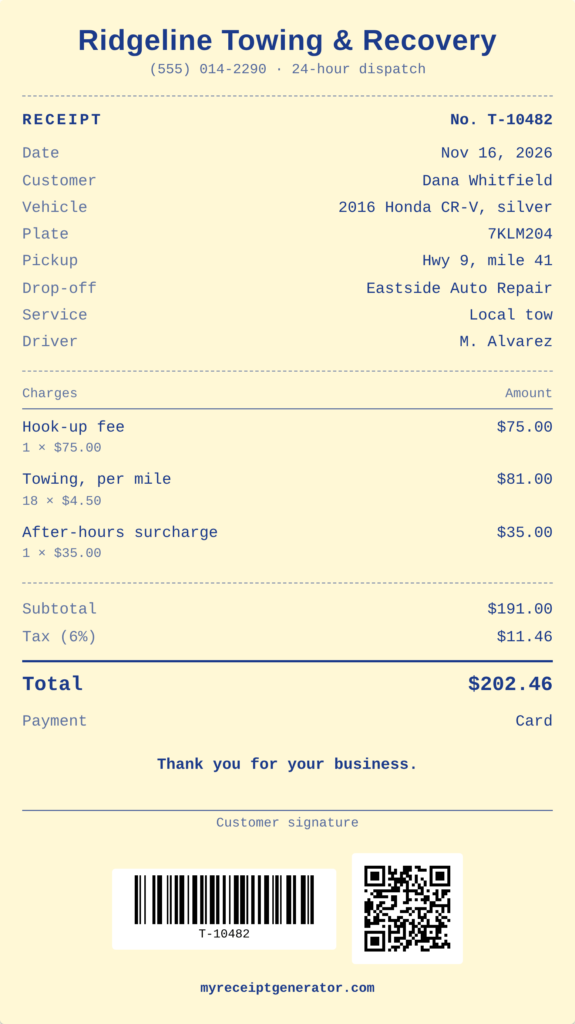
Yes, you can print a tow truck receipt from any printer, and carbonless NCR paper is the route for instant duplicates without a copier.
A 5.5″ x 8.5″ book is half of a letter sheet, and it comes as 2-part or 3-part sets. A print shop can run those books in full color if you want your branding on every copy.
For home or office printing, use a print-ready, high-quality download so the text stays sharp on paper. When you navigate a print shop’s ordering page, expect to pick parts, ink, and binding before the price appears, because a printed book cannot be changed after it runs.
When Does a Tow Truck Receipt Come in Handy?
A tow truck receipt comes in handy whenever someone needs to confirm what a tow cost and why.
Questions about mileage charges, the first few miles folded into a base price, or long distances are easier to answer when the receipt spells each one out. Numbered receipts help too: sequential numbering puts every receipt in order and turns a stack of them into a clean reference.
Fit matters as well. Each tow job has its own requirements, from a roadside jump start to a long haul, and a receipt that lists them saves everyone the hassle of a second phone call. A numbered, itemized receipt also holds up better when someone reviews the job later.
Where Can I Find a Towing Receipt Template?
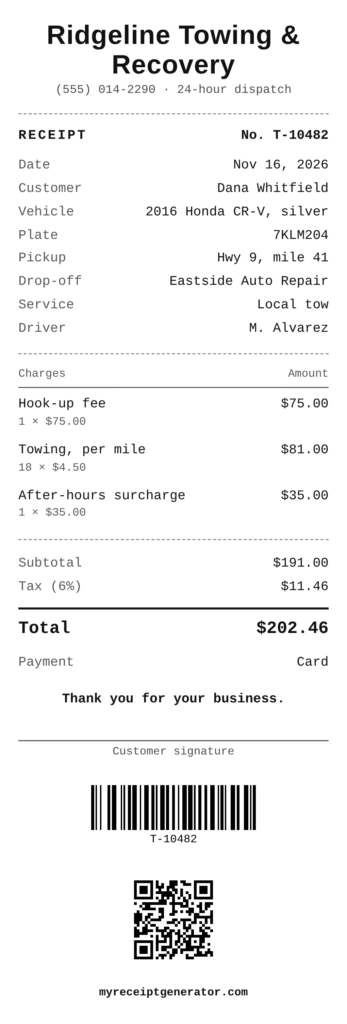
You can find a free towing receipt template right on this page, and it opens with no sign-up.
Open the tool, add the job, and the form keeps the customer information and vehicle details in one place. A line for signatures lets the involved parties sign when both sides want a signed copy.
The page also prints cleanly on 8.5″ x 11″ paper, so a receipt you fill in on screen works as a paper copy too. Related receipt types for rent, parking, and auto service sit in the template library if your work goes beyond towing.
Can I Brand the Receipt With My Business Details?
Yes, you can brand a tow receipt with your own business details, and every download is watermark-free.
Add these details once, and every download carries them:
- Company information: your business name and a brand image sit at the top of the receipt.
- Signature box: gives the person paying a place to sign.
- Pickup locations: show where the tow started.
- Drop-off locations: show where the job ended, so the route is easy to read later.
If your office wants scannable labels, pair the receipt with a barcode or QR codes made in the site’s other tools. Your branding appears on the receipt, not ours, and your browser reads the image directly instead of uploading it.
Why Use a Tow Truck Receipt Generator at All?
A tow truck receipt generator saves a towing company from rebuilding the same page for every job.
Each receipt starts with the same blocks and a payment method line, and a real-time preview shows mistakes before anyone else sees them. Fewer disputes start weeks later over what was agreed.
The tool needs no code, and you can assemble a personalized receipt in minutes, then reuse the same layout for every job. That one master version also feeds three back-office tasks:
- Expense reports: the itemized lines drop straight into a claim.
- Client invoicing: the same figures back up a bill.
- Reimbursements: a driver can show exactly what was spent.
That is why I keep one master version. A ready layout also means a new hire can issue a clean receipt on day one.
Is the Tow Truck Receipt Generator Free to Use?
Yes, the tool costs nothing to use, and you can make as many receipts as you need without an account or a watermark.
An account is optional. It lets you access your work later, but the receipt downloads either way. Upload a brand image in JPEG or another common format and it appears at the top of the page, read by your browser rather than sent to us.
Teams also use the same receipts for budget tracking, warranties, and returns. A dispatch desk can attach a receipt to the job it belongs to, so the paper trail starts the moment the tow ends.
Which File Formats Can I Download?
You can download a tow truck receipt as a PNG or a PDF file.
| Format | Best for | Why it works |
| PNG | Quick reference | Sharp image on a phone |
| Insurance claims and printing | Layout stays fixed |
Send the PDF when someone needs a formal copy, and send the PNG when a quick phone share is enough. Either way, the download carries no watermark.
Printed copies follow their own rules. A book can run in CMYK for color work or black ink for a lean budget, in loose sets, a padded book, or a booklet with a wraparound cover