Most people only think about a parking receipt after the fact, standing at a reimbursement desk holding a faded stub. The fix is simple and slightly boring: generate the document properly the first time, in a format that survives a year in a folder.
How To Make A Parking Receipt
The whole build is three steps and takes about a minute. I have timed it on a phone while waiting at a barrier arm.
- Add your company information: business name or organisation, address, phone, email. Hit the upload button for a logo. The logo upload accepts a standard square mark and scales it without distortion.
- Fill in the customer information. Enter the customer name, contact number, receipt number, and date from the calendar field. Each receipt number should be a unique ID, never a repeat. If you issue at volume, the invoice number generator will keep your sequence clean.
- Enter the line items. Quantity, description, unit price, amount. The row auto-calculates. Use add more rows for a second vehicle or an overnight extension.
Then layer the money details. Apply taxes and discounts at the row level with a per-item tax percentage, or drop in a fixed amount or discount percentage at the bottom. The total updates automatically, so there is no arithmetic and no stale figures.
Before you export, fill in the parking location, facility name and facility address, the vehicle info, the parking time, the amount paid, and the session details. Add notes or a short message for the customer, then your terms and conditions if you operate commercially.
Everything renders in real time. Pick a template, make it yours, then save and download. Download PDF or PNG in one click, send by email, or print straight to a receipt printer using the thermal-style layout. A phone screenshot works in a pinch, but the PDF is what finance teams accept.
Extra fields worth switching on: payment method selection, multi-currency support, and digital signatures, either typed or drawn signatures for handover situations. If you want the long version, our eight-step walkthrough covers the edge cases like split payments and partial refunds.
What A Parking Receipt Should Include
This is the part people get wrong. A parking charge with no context is not a document. It is just a number.
Time And Rate Fields
- Entry time and exit time, with duration auto-calculated
- Rate type: hourly, daily, or flat rate
- The rate itself and the total charge
Location Fields
- Facility name, facility address, trading name, street address
- Space, level, zone, and space number for larger sites
- Vehicle location if the site is multi-storey
Money Fields
- Total amount paid and final charge
- Taxes shown separately, which you can work out with the VAT and GST calculator
- Payment method: cash, card, contactless, or app. This is what proves money changed hands.
- Payment details and an itemised list with clear totals
Discounts And Extras
- Validation code, plus any discounts or validations issued by retailers, offices, hotels, or event venues
- EV charging fee as a separate line item, never folded into the base charge
Identity Fields
- Business name, garage name, receipt number
- Customer information and vehicle information
- Notes and terms and conditions
- A barcode or QR code if your site uses exit-gate scanning
Why this matters practically: the date of transaction and time stamp are what settle disputes. Tax authorities across most countries expect you to substantiate a business deduction with the place of the expense, the date, the amount, and the business purpose. The IRS spells this out in plain language, and the UK, EU, Canadian,n and Australian equivalents ask for the same four things in different words. Get those verified on the page and the claim survives review. A reimbursement request with a bare tax figure and no location gets bounced.
Customise And Brand Your Parking Receipt
I have set these up for two very different users. One was a facility manager who wanted every receipt to match his signage. The other was a freelancer who just wanted quick records that did not look homemade.
Visual Controls
- Font choice: mono for a machine-printed feel, serif for formal, sans for clean
- Brand colours and an accent colour to match your company style
- Logo upload with adjustable logo visibility
- Paper styles: thermal paper for a narrow slip that mimics garage ticket machines, or white paper for a full-page professional look
- A drag-and-drop builder with real-time preview
Currency And Tax Controls
- Currency selection covering USD, CAD, AUD, EUR, and GBP, with control over whether you show the currency symbol or the currency code. Useful for international customers
- Tax 1 and tax 2 slots handling VAT, GST, HST, sales tax, PST, QST, or WHT. For US rates specifically, the sales tax calculator saves a lookup.
- Discount, shipping, service charge, and tip lines. Valet sites use the tip field more than you would expect, and the tip calculator handles the split.t
- Amount in words for jurisdictions that expect it
Payment And Verification
- Payment method, last 4 digits, approval code, reference number
- Cashier name, register number, store number
- Barcode and QR codes for payment verification. You can produce either with the barcode generator or the QR code generator
- A PAID IN FULL stamp
Signatures And Closing Details
- Signatures, either typed or drawn, for seller, buyer, or agent
- Loyalty points, custom messages, footer text
Contact And Session Data
- Contact details: email, phone, website link
- Extra information and additional files such as warranties or service guidelines
- Entry time, exit time, duration, rates, validation details
- Garage name, location, space number for parking tickets
Export formats cover PDF for expense reports, PNG for quick records, and JPEG for reimbursement claims. With custom styling locked in, your expense documentation looks consistent across a whole year.
Download, Print And Export Formats
Three export formats, three jobs.
| Format | Best for | Trade-off |
| Print-ready filing and organised receipts | Largest file | |
| PNG | High-quality images for embedding | No text layer |
| JPEG | Compressed, smaller files to share fast | Slight quality loss |
You can email a copy directly, print it, or keep saved receipts in your account. Every download is watermark-free. If you send by email, receipt-opened tracking tells you when the client actually looked at it, which helps when someone insists they never got it.
When You Need A Parking Receipt
Business Contexts
- Expense reports and general business expenses
- Company reimbursement and staff reimbursements
- Tax documentation, annual filing, and claimed deductions
- Client invoicing and client billing where you pass costs through
- Professional receipts for client meetings
Personal Contexts
- Proof of purchase supporting warranties or returns
- Budget tracking and monitoring spending
- Organised records for refunds
- General expense documentation
Typical Situations
- Airport parking before a work flight
- Conference venue meters
- Ordinary city parking during a client day
Who Uses It
- Parking garage operators
- Surface lot managers
- Car park operators
- Individual drivers
Parking rarely travels alone on an expense claim. If you are reconstructing a full business trip, the taxi receipt template and the hotel receipt template cover the two line items that usually sit either side of it.
Why A Parking Receipt Beats The Ticket In Your Glove Box
Here is the slightly unpopular take: the machine stub is nearly worthless as evidence. A ticket that spends three months in a glove box fades, and thermal ink dies fastest in a hot card slot near a windscreen.
More importantly, the stub usually omits the facility name, the address, and the business details of the operator. It records a transaction for the barrier, not for your accountant.
For the average driver, that is a shrug. For anyone logging a work expense, chasing a reimbursement, or claiming a tax deduction, it is a failed record. I have watched business travellers lose small claims over and over, not because the expense was invalid, but because the proof had gone unreadable.
Documenting parking properly means capturing the amount, the date, the place, and the business purpose. IRS Publication 463 sets out that four-part standard clearly, and it confirms that parking fees during business travel are fully deductible even when you use the standard mileage rate for the same trip. Other tax authorities word it differently but ask for the same evidence. A generated receipt carries all four fields by default.
Parking Receipts And Business Tax Deductions
Business parking fees are generally deductible when the parking supports a qualifying work activity. Under IRS Publication 463, parking at client locations, conference venues, and airports for business flights qualifies. Treat that as a useful reference point rather than a universal rule, because the details shift between countries.
The standard mileage rate does not absorb it. Parking is claimed on top of the mileage for the same trip, and in my experience that is the single most commonly missed deduction.
The exception is consistent worldwide. Parking at your regular workplace is a nondeductible commuting expense. Daily office parking is not a deduction in any system I have checked.
To defend either a deduction or an employer reimbursement, your receipt needs the location, the date, the amount paid, and the duration. If you are self-employed in the US, that figure lands on Schedule C. Elsewhere, it goes on the local equivalent.
Retention: keep receipts for three years as a baseline. The UK HMRC guidance on business records asks for longer, so check your own rules. Digital copies beat paper every time.
Parking Receipt Templates
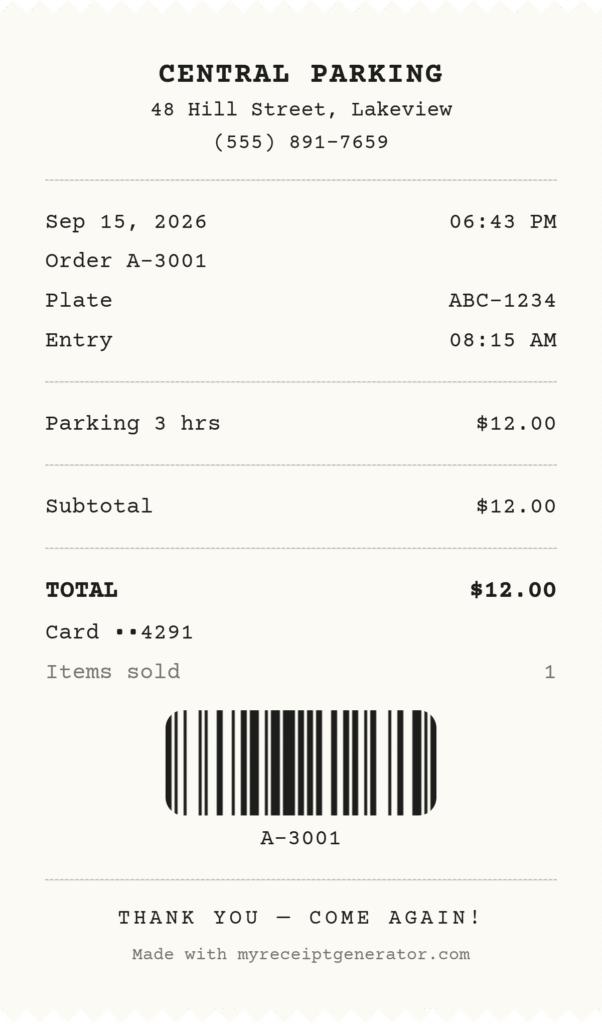
payment, and a scannable barcode. Every export downloads clean, no watermark.
The library runs to nine template variants, each with a preview image, a short sample, and a direct call to action.
Coverage includes free, printable, blank, simple, fillable, professional, downloadable, and editable layouts. Every one carries the core fields: company name, parking location, time, amount paid, and vehicle information. Then you print, download, or email.
Pick the blank one if you are issuing at volume. Pick the professional one if a client will see it. You can browse the full receipt template library or jump straight into the receipt maker and start filling fields.
Do Downloads Have A Watermark?
No. PDF, PNG, and JPEG exports come out clean on every plan, including the free one. Some receipt tools add a watermark on free downloads and remove it only when you pay. That is not how this works.
Other Receipt Template File Formats
If you would rather work in software you already own, the same templates exist in other file formats.
- Word and Google Docs: best for simple editing and controlling the look and feel
- Excel and Google Sheets: better when you are handling numbers and want formula-based tracking
Sheets win for organising receipt details across a quarter. Docs win when you need one clean copy. Either way, the goal is a clear sales record that reads the same in twelve months. If you handle recurring payments too, the rent receipt template and the cash receipt template follow the same field logic.
Frequently Asked Questions
Is The Parking Receipt Generator Free?
Yes. You can build and customise receipts with no sign-up required. The free tier covers everyday use, with no watermark and no account needed. Watermark-free exports at higher resolution and saved receipts are on the Pro plan, which opens with a 14-day free trial and asks for no credit card up front. Current Pro pricing is listed on the pricing and plans page, and you only upgrade if you want the extras.
What File Formats Can I Export?
Three. PNG for high-quality images, PDF for print-ready documents, and JPEG when you want a compressed file with a smaller file size to email. Any of them print cleanly. Choose the export format based on where the file is going, not out of habit.
Can I Use A Parking Receipt For A Business Expense Report?
Yes, and most companies now prefer generated receipts over stubs. For a business expense report covering parking, whether airport parking or ordinary city parking, include the facility name, address, entry times, exit times, the rate, and the total. Those six fields are what reimbursement approval usually hinges on.
Is Parking Deductible If I Already Claim The Standard Mileage Rate?
Yes. Business parking fees are deducted separately from the standard mileage rate, even on the same trip. Keep the receipt and note the business purpose alongside your mileage log. Rules vary by country, so confirm locally, but the separate treatment of parking is common practice.
What Is A Validation Code On A Parking Receipt?
It is the reference proving a third party covered part of your parking. A validation code records a discount or free-parking approval issued by a retailer, hotel, office tenant, or event organiser. Without it on the receipt, the reduced total looks like an error.
What Is The EV Charging Fee Field For?
More facilities now run EV charging points. If a driver charges during a session, that fee should appear apart from the base parking fee. For business travellers, splitting it out matters, because a separate charge maps to different expense categories in most corporate systems. Merged totals get queried.
Do I Need Entry And Exit Times On A Parking Receipt?
For hourly rates and daily rates, yes. Entry times and exit times drive the charge calculation and let the customer verify the total. For flat-rate parking, they are optional but still useful as evidence that a specific vehicle was at a specific facility. If you are claiming a deduction or a reimbursement, timestamps tie the stay to a business activity and substantiate the work-related expense.
How Long Should I Keep Parking Receipts For Tax Purposes?
Three years from the date of the return where the expense was claimed is the common baseline. It matches the IRS statute of limitations for examining returns, and several other jurisdictions use a similar or longer window. Store PDFs rather than paper. Long-term storage of faded paper receipts leaves you with illegible slips at tax season.
Can Parking Operators Use This To Issue Receipts To Customers?
Yes, and that is a large share of the use. Garage operators, surface lot operators, and facility operators can set the facility name, address, and branding once, then fill in session details per transaction and issue a PDF on the spot. The template holds the same fields every time, so a customer filing an expense report or a tax claim has what they need, and you get fewer end-of-year follow-up questions.