Service Receipt Maker: Create, Download, and Send Receipts for Service Work
A service receipt is the document you give a client after they pay you for work. It records who paid, how much, when, how, and what the money covered. You can fill one in with the generator above, check the numbers, and send it as a PDF. Contractors, freelancers, cleaners, repair technicians, and consultants all use them, mostly for the same reason: without a written record, a payment made three months ago turns into a debate about who remembers what.
The details change a little by trade. A repair job usually needs labor and parts on separate lines. A consulting project needs a clear description of what was delivered. A home service visit needs the payment method and any balance still owed. If you’re after a different kind of receipt, the full list is on our receipt templates page.
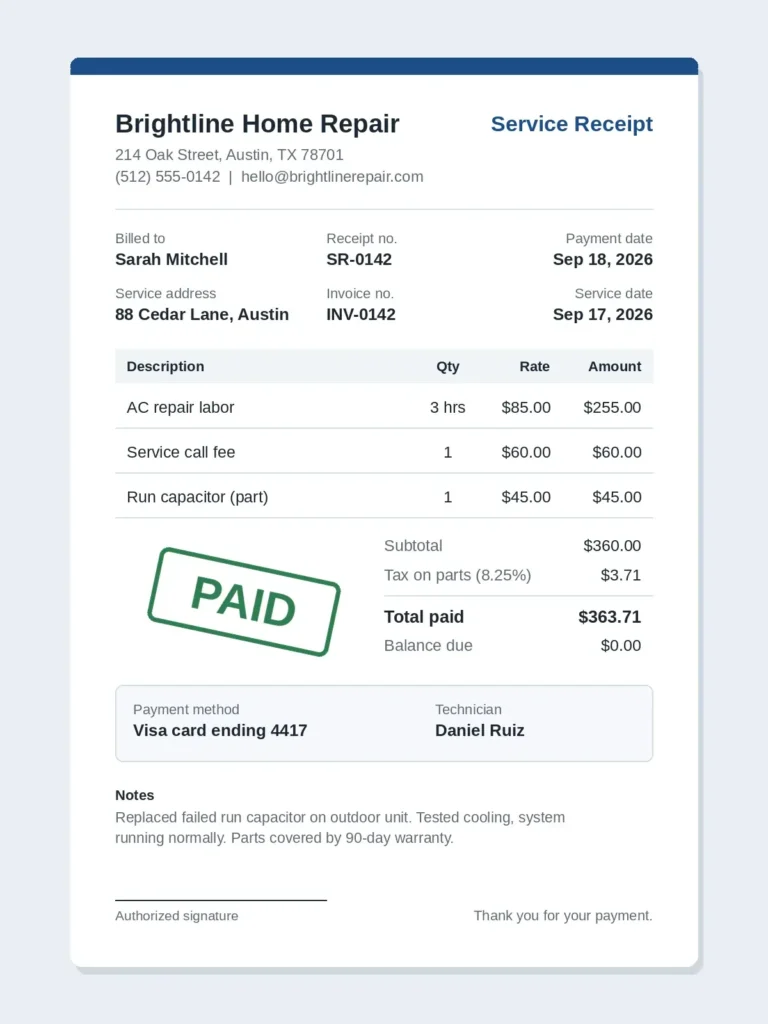
What Is a Service Receipt?
It’s a record of payment for work that has already been done. People sometimes confuse it with an invoice or a contract, but those serve different purposes. An invoice asks for money. A contract sets the terms before work starts. The receipt comes last and confirms the payment actually happened.
Most service receipts carry the same basic fields: the payer, the business receiving the money, the payment date, the amount, the payment method, and a short description of the service. Many also reference the original invoice number so the two documents can be matched later. A signature line is common but not always needed.
In the United States, there’s no official federal receipt format for private businesses. What the IRS does expect is a set of records that supports your income and expenses, and receipts are one of the standard supporting documents it lists in Publication 583. Countries that use VAT or GST often have stricter rules about what a receipt or tax invoice must show, so check the local requirements if you work outside the US.
What Should a Service Receipt Include?
A useful service receipt answers five questions for anyone who picks it up later, whether that’s the client, your bookkeeper, or a tax auditor.
- Who is involved? Your business name, address, phone number, and email, and the name of the client or company that paid. Some businesses also add a tax ID or registration number.
- What document is this? A title that says “Service Receipt,” a unique receipt number, the related invoice number if there is one, and the date the payment was received.
- What work was done? A plain-language description of the service, the date or period it covered, and the charges broken into line items. If you supplied parts or materials, list the quantity and price of each.
- What was paid? The subtotal, any tax, discounts or credits, the total paid, and whatever balance is still due. Also note the payment method, such as cash, card, check, or bank transfer.
- Who confirms it? A signature or signature line, if you use one. Notes and extra references are optional.
Descriptions are where most receipts fall short. Compare these two line items:
- “Website maintenance, March 1 to 31, 2026, 6 hours at $85 per hour, $510”
- “WM-03 service, $510”
Anyone can understand the first one. The second only makes sense to whoever wrote it, which usually means a follow-up email from the client or a question from the accountant.
Before sending, it’s worth checking that the total on the receipt matches the amount that actually landed in your account, on the same date.
Why Use a Service Receipt?
Receipts matter most when something goes wrong. If a client later says they didn’t pay for a visit, or pays twice by mistake, a numbered receipt with a clear description settles it quickly. Bank statements show that money moved, but they don’t show what the money was for.
A template helps because the fields are already laid out. You’re not rebuilding the same document for every job, and every client gets receipts that look the same, which makes your business look more organized. It also means your records are consistent when tax season comes around, since every receipt has the same information in the same place.
Is a Service Receipt Legally Required?
That depends on where you operate and the type of sale. Many places don’t have a general law requiring a receipt for every service transaction, but some states, countries and industries do, particularly for cash payments or for businesses registered for VAT. If you’re not sure, your local tax authority’s website is the most reliable place to check.
Keeping records is a different matter. Tax authorities in most countries expect you to be able to back up your income and any business expenses you deduct, and receipts are one of the simplest ways to do that. Clients often need them too, for their own bookkeeping or expense claims.
A receipt is most useful when it has accurate amounts, clear dates, and all the standard fields filled in. Signatures aren’t usually required, though they can help if a payment is ever disputed. If you send receipts by email, some businesses add a line confirming the client agreed to receive documents electronically.
Service Receipt vs. Invoice vs. Estimate
These three documents get mixed up a lot, and it causes real problems. A paid receipt that still says “Invoice” at the top can lead a client to pay again, or leave your bookkeeper unsure whether the money came in.
| Document | When It’s Issued | What It Does |
| Estimate or quote | Before work starts | Gives the expected price |
| Invoice | After the work, before payment | Requests payment and states the due date |
| Receipt | After payment | Confirms the payment was received |
Tax on services is its own topic. The US has no national sales tax, and each state decides which services are taxable. California mostly taxes physical goods, so repair labor is often not taxed while the replacement parts are. Texas lists 16 categories of taxable services, including repairs to personal property and several kinds of real property services, according to the Texas Comptroller. This is a big reason to keep labor and parts on separate lines. If you do need to add tax, the sales tax calculator can work out the amount.
For VAT or GST, the rules come from the country where the service is supplied. The VAT and GST calculator handles the math, but confirm the correct rate for your location first.
Templates or a Billing System?
If you only issue a few receipts a month, a template is usually enough. You fill it in, check the total, tax, and invoice reference, save it as a PDF, and keep a copy.
Things get harder once you’re billing several clients by the hour. At that point, many people move to accounting or billing software that tracks time, stores each client’s rates and payment terms, and flags work that hasn’t been invoiced yet. Tools like QuickBooks Online, Xero, and FreshBooks can generate receipts automatically when a payment is recorded, which cuts down on retyping and the mistakes that come with it.
Service Receipts by Type of Business
Different trades need slightly different details. A receipt that matches how your client actually paid, and describes the work in words they recognize, is less likely to cause questions later.
Freelancers and Consultants
Strategy, design, writing, development, and coaching work often doesn’t produce anything physical, so the receipt needs to explain what was paid for. Including the project name, the phase or milestone, the dates, and the hours makes it much easier for a client’s finance team to approve and file.
Repair and Maintenance Jobs
Keep labor and parts on separate lines. They’re often taxed differently, and customers usually want to see what the parts cost. Add the service date, a short note on what was repaired, the amount paid, and any balance left if the job isn’t fully paid yet.
Home and Field Services
Cleaning, landscaping, plumbing, electrical work, pest control,l and moving jobs mostly happen at the customer’s property, and payment is often taken on the spot. Sending the receipt by text or email right after the visit works well. Include the service address, since some customers own more than one property.
Paid Invoices as Receipts
Some businesses don’t issue a separate receipt at all. They mark the invoice as paid instead. This works fine as long as the paid version shows the payment date, the payment method, and a zero balance.
When to Issue a Service Receipt
Issue one every time you receive a payment, not only when a job is paid in full. Deposits, installments, and final payments should each get their own receipt, and ideally each one references the others so the client can see the full history.
Cash payments need receipts the most, because there’s no bank or card record to fall back on. For payments that are purely cash, a cash receipt may suit you better.
If the sale is mostly products with little or no labor, such as selling equipment with a short installation, a sales receipt is usually the better choice.
Practical Tips for Service Receipts
- Send it quickly. Aim for the same day, or within 24 hours. Details are easier to get right while the job is fresh.
- Be specific about the payment method. Write the check number or the bank transfer reference, not just “paid.” It makes matching payments at year-end much faster.
- Number receipts in order. Sequential numbering makes missing or duplicate receipts easy to spot. The invoice number generator can help you set up a consistent format for both receipts and invoices.
- Add a short note when scope matters. For example, on a logo design project: “Final files delivered, 3 revisions included.” It answers the question before the client asks it.
Who Uses Service Receipts?
Mainly freelancers, contractors, small businesses, and independent service providers. In other words, anyone who is paid for their time or skill rather than for a product. Most of them use a template set up for the kind of work they do, so client details and payments are recorded the same way each time.
Designing a Clear Service Receipt
Many clients will open your receipt on a phone, so keep it easy to read on a small screen. Separate the business details, client details, work description, and payment information into their own sections. Put the title and receipt number near the top, use a readable font size, and leave enough space between sections.
Notes and optional fields can go at the bottom.
Printing and Sending Service Receipts
Use Letter size for clients in the US and Canada, and A4 for most other countries. Printing on the wrong size can cut off the margins. For on-site work, a printed copy is still handy, especially for customers who don’t use email much.
When sending by email, a PDF is the safer choice because it can’t be easily edited and looks the same on every device. The receipt generator guide goes through the whole process step by step.
Service Receipt File Formats
PDF is the most common format for sending receipts to clients. Word files are useful if you want to edit longer service descriptions, and Excel works well for hourly billing because it can total the line items for you.
Creating a Service Receipt with AI
AI tools can put together a service receipt from a short description of your business and the job. They’re quick, but they sometimes get tax rates or totals wrong, so check every number before sending. You can also build one directly with our receipt maker.
Frequently Asked Questions
What Should Be Included on a Service Receipt?
Your business name and contact details, the client’s name, a receipt number, the invoice number if there is one, the payment date, a description of the service, itemized charges, tax, discounts, the total paid, the payment method, and any remaining balance.
Why Use a Service Receipt Template?
It saves time, keeps your receipts consistent, and makes sure you don’t leave out important details. That consistency helps with bookkeeping, taxes, and any payment disputes.
Is a Service Receipt Legally Required?
It depends on your location and the type of transaction. Even where it isn’t required, tax authorities generally expect records that support your income and expenses, and receipts are a simple way to provide them.
Is a Service Receipt the Same as an Invoice?
No. An invoice asks for payment, and a receipt confirms that payment was received. If you turn an ininvoice into receipt, change the title, add the payment details and show the balance as zero.
Should a Service Receipt Include Sales Tax?
Only if the service is taxable where you work. In the US, each state sets its own rules for taxing services. In countries with VAT or GST, national rules apply. If you charge tax, show it on its own line.
Does a Private US Business Need a Federal Receipt Format?
No. The IRS doesn’t require a specific receipt format for private businesses. It expects records that clearly show your income and expenses, and any format works as long as the information is complete and accurate.
Which Receipt Mistake Causes the Most Bookkeeping Problems?
Receipts that don’t clearly link a payment to a specific job or invoice. Vague dates, amounts, or payer names force whoever does your books to match payments by hand against bank records and emails.
Can I Customize a Service Receipt Template?
Yes. You can add your logo, brand colors, line items specific to your trade, and extra fields such as a service address or technician name. Keep the layout simple so the payment details stay easy to find.
What File Formats Can I Use for a Service Receipt?
PDF is best for sending to clients. Word and Excel are easier to edit, and Excel can calculate totals automatically.
Can I Create a Service Receipt Using AI?
Yes, AI tools can draft one quickly from a short prompt. Always check the tax and totals before you send it to a client.