A parmacy receipt shows the pharmacy name, address and phone, then each purchase as a row in the line items list with quantities and price, followed by the sales tax, the total and the card type or cash that paid for it.
Tel:
License
Tel · License
Tel:
Store # · License
Most of that sits in a fixed order. The cashier and transaction details come near the top, chains add a store number, and the date fixes when the sale happened. A drugstore counter prints vitamins and medicine on the same strip, so the slip has to separate them cleanly. When the seller leaves a field blank, the buyer holds a weak document.
I treat a good slip as proof of transactions. Kept together, those receipt records work as legal documentation if someone questions a purchase later. Sale prices and loyalty savings print under the product they reduce, and the rates that apply to each row decide how the final number was built.
Which Fields Belong on a Pharmacy Receipt?
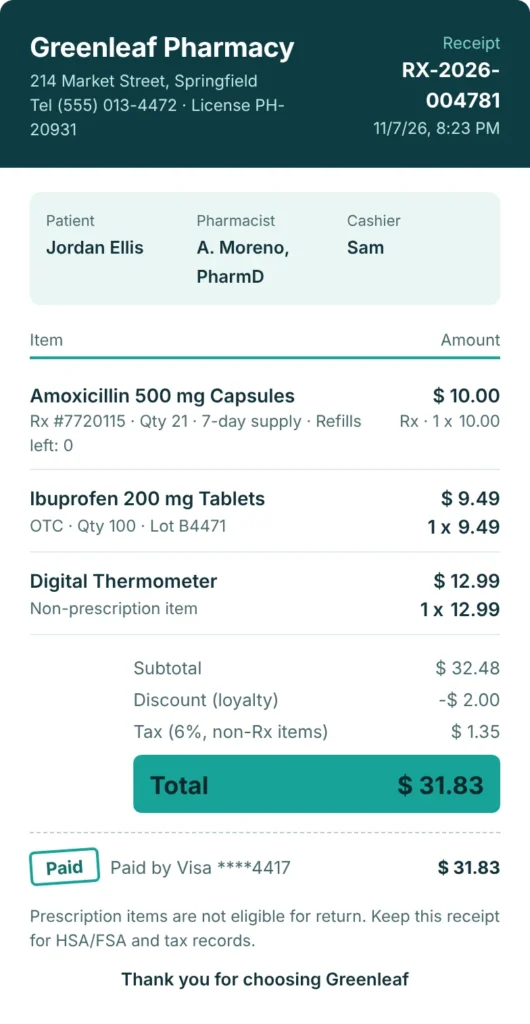
A pharmacy receipt needs an item name and a date and time for every sale, plus enough seller identity for the buyer to trace it.
On the product side, list itemised medicines and health products by name and show any discounts that changed the bill. Give tax its own tax line so nobody has to guess how the final figure was built. In my experience, slips without that tax line attract the most follow-up questions.
Invoice-style versions add identity fields:
- Business details: the seller’s name and contact data.
- Client information and bill-to client details: who pays and where the bill goes.
- Tax identifier and auto-generated number: how the sale is traced in your system.
- Payment instructions and work completed: how to pay and what was delivered.
Card data carries its own legal limit. 15 U.S.C. § 1681c(g), known as the FACTA truncation rule, stops a merchant from printing more than the last five digits of a cardholder’s number on a point-of-sale receipt, and bars the expiry date entirely. Most printers stop at four digits, which sits inside the legal requirement. The source was last checked on August 19, 2026.
A plan administrator generally wants an itemized receipt, because a plain payment slip does not show what was bought. A print-ready PDF from a generator or a PDF export from invoicing software gives you a clean file copy.
How Do You Make a Pharmacy Receipt Step by Step?
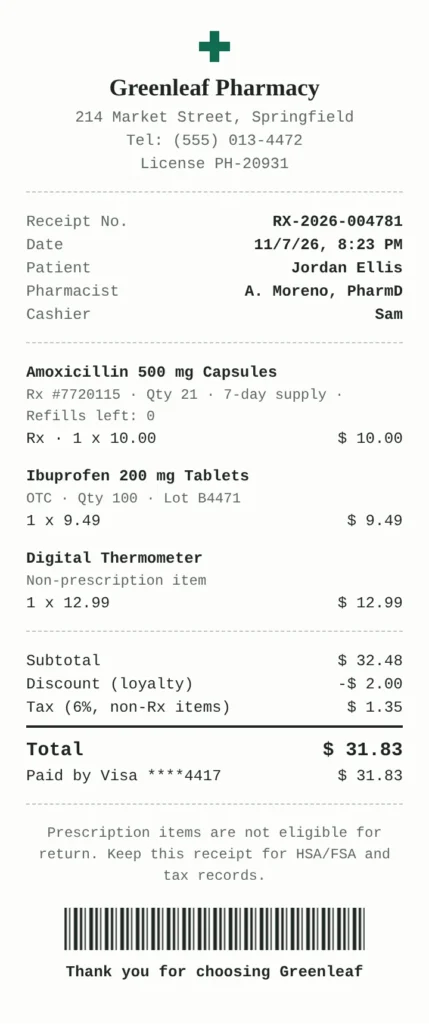
You make a pharmacy receipt by entering the seller and buyer details, adding each item, and exporting the finished file.
Pick a free generator with no signup, no card and no account. One tool offers its first invoice with no watermark, then pushes a 7-day Pro trial for extras. Other tools mark their output, so inspect it before you rely on it.
- Enter the seller details and the client details the form requests.
- Add every product on its own row, with the size in the name, such as Ibuprofen 200mg 100ct.
- Mark the taxable lines and enter the tax percentage.
- Check that totals update and calculate automatically.
- Export the file and keep it somewhere safe.
The sample slip is stamped 06/14/2026 09:31 and carries Receipt #280853 and RX #7116861. The buyer paid with Credit •••• 4821, so only the last four digits appear.
| Sample item | Units | Each | Line sum |
| IBUPROFEN 200MG 100CT | 1 | $8.99 | $8.99 |
| Vitamin D3 2000IU | 1 | $12.49 | $12.49 |
| Adhesive Bandages 40ct | 1 | $4.79 | $4.79 |
Those rows add up to $26.27 before tax. Tax at 4.81% comes to $1.26, and the final figure reads $27.53.
What Do Pharmacy Receipt Generators Charge and Offer?
A generator may charge fees for extras, so read what each tool unlocks before you commit to it.
An online receipt generator usually opens a template with a live preview, lets you download the result and offers email delivery. Styles split into a generic receipt style, a Pharmacy Receipt style and a professional-quality customized layout. One site publishes a Pharmacy template page, and a drugstore receipt page on another lists digital receipt templates by industry.
The audience differs by page. Chemists, dispensaries and locum pharmacists get a pharmacy invoice layout on one site, while another generator serves clinics as well. Neighbouring pages offer a Medical Receipt, a Dental Receipt and a Veterinary Receipt.
Guides run 5 steps on one page and 3 steps on another. Both cover itemised lines, and the second says totals calculate automatically. For payment details, a bank transfer line works, and a fee calculator shows what payment apps take.
Pick one look and hold it. Brand colours and brand templates keep every document consistent, whereas mismatched templates create an inconsistent look that reads as unprofessional.
Why Keep Pharmacy Receipts at All?
You keep pharmacy receipts because each one ties a cash sale to a seller, a day and an amount.
One sample shows how little a receipt needs. It records a sale from March 13, 2021 for 1095.12 PKR, prints as a computer-generated receipt and states that it needs no signature or stamp. The computer-generated notice at the foot replaces both, and the sheet lists return policies with a single return policy line for buyers.
Receipts carry weight beyond the counter. A buyer uses them for medical expense tracking, a seller for sales tracking, and clinics hand out patient receipts. One provider claims its samples follow establishment bylaws and state laws, and says a receipt sums up a purchase agreement or sales agreement. I would treat both claims as unproven until a source backs them, and clear slips help customer satisfaction, in my experience.
Health plans change the stakes. Many drugstores mark rows as HSA eligible or FSA eligible, so the card is charged for those rows only, and the plan itself decides what qualifies for an HSA or FSA. If a slip goes missing, ask the store for a reprint. Most chains can reprint one or show the purchase in account history.
Invoice tools add more. Send & track by email and payment status tracking keep delivery visible, saved clients & invoices spare retyping, and draft/sent/paid tracking shows what stage each bill is at. Use that to send the invoice and watch the outcome.
What Details Trip People Up on a Pharmacy Receipt?
Tax treatment trips people up most, because a single tax rate rarely fits every row.
Check the math in order. Each product shows a pack size and a strength, the subtotal comes from qty × price, and tax goes on afterward. Where it applies, a GST calculation follows the same order. Compare the amount paid with the total amount paid on the slip. In my experience, a gap means a missing row.
Records come second. Receipts feed recordkeeping at home and patient recordkeeping at a clinic, and every record doubles as proof that a purchase happened. Clean organised records make tax filing and compliance checks less painful, and they give you something to point to if disputes or legal cases arise.
| Who asks | Records they want | Context |
| Accountant | medical expense tax records | tax time |
| Shop owner | income and expense tracking | store income, store expenses and sales information |
| Household | household health budgeting | Monthly spending |
| Designer | healthcare app design mockups | Copying real fields |
| Buyer | Proof of purchase for reimbursement | Plan review |
One tool advertises its basic generator as free forever. I still check what the export contains before I trust it.
How Do You Add a Prescription Line to a Pharmacy Receipt?
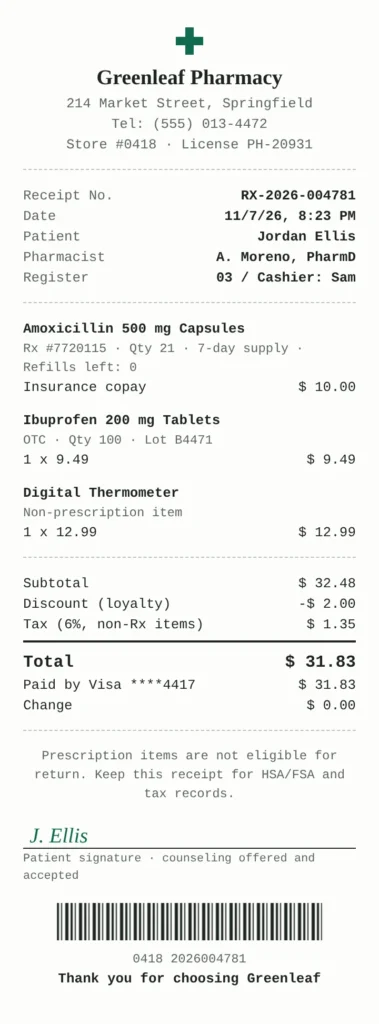
To add a doctor-ordered medicine to a receipt, name the entry with the pharmacist’s reference number, enter what the buyer paid, and mark it exempt from tax.
The sample template loads with three over-the-counter items, and any over-the-counter product rings up like an ordinary sale. Pages describe them as personal care items on one site and personal-care items on another. The doctor-ordered row stays untaxed in almost every state, whereas over-the-counter items may be taxed in some states.
Fill the top of the slip as usual: the Register ID, the register details, the payment method and the card used. Keep a copy for HSA / FSA expense records.
How Do You Make a Pharmacy Invoice?
You make an invoice for a pharmacist’s sale by entering the seller, the buyer and the products, then letting the tool do the adding.
Enter the business name, the client name and the billing address, then give the sale a unique invoice number. Some tools simply label the field invoice number. Set the issue date, the due date and the payment terms. Where a tax invoice demands it, add the ABN, show the GST separately and list a BSB/account or a payment link, along with the total amount due.
Rows need customer pricing information and discount information so price accuracy holds up under review. One page promises Done in 60 seconds, and its how-to says about 60 seconds. A paid invoice then serves as proof of payment, and an outstanding-balance view shows what remains unpaid.
The payoff shows up in fast billing and streamlined billing: less paperwork, clean itemised records and a consistent professional look. Careful billing also keeps every invoice consistent.
Is a Pharmacy Receipt Generator Really Free?
On the pages I reviewed, the basics cost nothing and paid tiers add the extras.
One generator sells Pro from $3 to remove its mark, and another invites you to upgrade for your logo & branding, applicable tax calculation, recurring invoices and client and invoice storage. Its comparison table lists a professional invoice PDF for both tiers, and a third site’s button reads Get Started Today.
The alternative is a spreadsheet or word file. Manual maths leads to broken totals, reformatting eats time, and a static file gives the buyer no route to pay, so payment drags and slow approval follow.
Can a Pharmacy Receipt Support an HSA or FSA Reimbursement?
A receipt supports a health-plan claim only when the plan accepts it, and the plan alone decides.
A card statement alone does not show what was bought, so the plan checks purchases against its plan’s list. Confirm that items qualify before you submit. A receipt you build yourself belongs in your own files, and a plan that wants the seller’s own copy will ask for that instead.
A doctor-ordered purchase shows an Rx number and a prescription entry. Clinic-style receipts add facility details, patient information and services provided, and one generator files its page under Healthcare & Wellness.
Export a PDF, PNG, or .docx copy. A professional PDF looks cleaner than a screenshot. The free download carries a small watermark on one generator, and a watermark-free version needs Pro there. Another tool’s paid trial covers creating, saving, sending and tracking.
Is Medicine Taxed on a Pharmacy Receipt?
Prescription medicine is untaxed in almost every state, while over-the-counter medicine is taxed in some states and exempt in others.
Cosmetics, snacks and household items are taxed in full, which is why a slip can show tax far below the rate times the subtotal. Tick Not taxed on rows the state exempts, and the tool works out tax on the rest. The Not taxed boxes therefore decide the base.
A prescription line shows the copay, not the drug’s full price. A line such as RX 4471920 and other prescription lines follow that pattern, and sites describe the result as prescription receipts with a tax-exempt prescription row. The price of medicine on over-the-counter rows follows state rules.