By Iqra Tariq
Receipt style
Shop details
Receipt
Vehicle and wash
Services and add-ons
Charges and payment
QR code and barcode
What Is a Car Wash Receipt?
A car wash receipt is a written record, issued after payment, that lists the services performed, the vehicle, and what the customer paid.
A receipt only works if it stands on its own. A professional car wash receipt carries the Company Name at the top, the Date, a clear Description of Services, and the Total. Leave one out, and you will probably get a call about it.
Some owners go further and list labor costs, materials used, and the completion date, so the customer sees what the charge covers. That detail helps most when the job is bigger than a quick rinse. It also protects the shop if a customer disputes a charge weeks later.
A lost receipt is the usual reason people search for a receipt template. A related paper, the Car Detailing Receipt, covers a different situation and gets its own section below.
What Information Must a Car Wash Receipt Include?
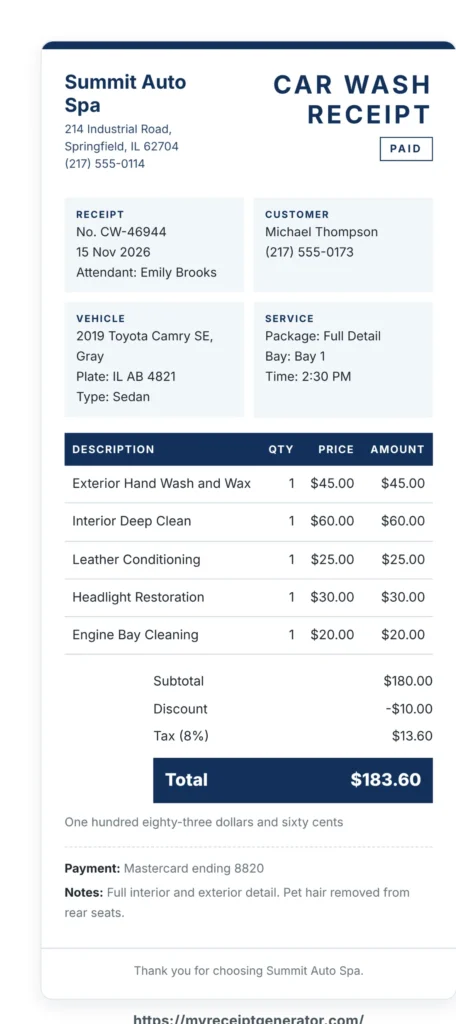
A car wash receipt must show who sold the service, which vehicle received it, what the shop did, and how the money adds up.
The top of the page carries the business information of the shop: its name and contact lines. Below that sits a block for the vehicle, so the customer can match the paper to the car that came in. Both blocks are needed, because a receipt without them is hard to trace later.
The money section follows a fixed order, and the table below shows it.
| Line | What it records |
| line items | Each service performed, one per row |
| Subtotal | The sum of every row above it |
| Tax | The tax rate your government requires, applied to the subtotal |
| Amount Paid | The exact payment the customer handed over |
Each row needs a quantity and a unit charge, and you multiply them to reach that row’s figure. An itemized receipt template follows this row-by-row layout. If you are unsure of the rate, a VAT and GST calculator or a sales tax calculator gives you the number before you fill the receipt in. The amount due is whatever the customer still owes after the charges are added up. When the customer settles it in full, the receipt becomes proof that the account is closed. If payment has not happened yet, you need an invoice instead, and the invoice templates page covers that.
At the bottom, someone authorized to represent the shop adds an Authorized Signature and prints their name on the Representative Name line. An unsigned receipt looks unfinished to both customers and accountants.
What Does a Real Car Wash Receipt Look Like?
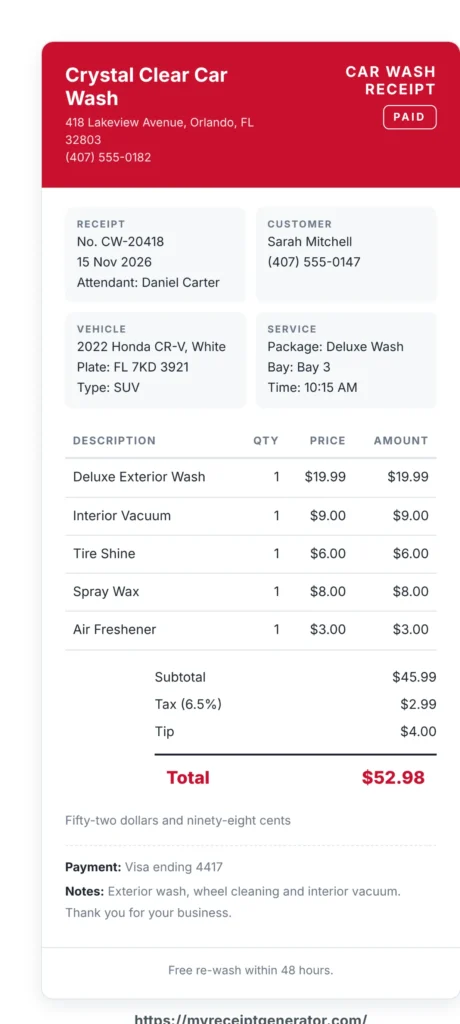
A real car wash receipt looks like a short, one-page record that identifies the vehicle, lists the work, and states how the customer paid.
The vehicle information block asks for four fields: Make, Model, Year, and Color. Together, they identify the car and let the customer confirm the receipt is theirs. Without them, nobody can say for sure which car came in.
Payment gets its own line. The payment method line records how the customer paid. Put it right above the signature so it is not overlooked. A payment receipt template puts that line front and center.
Behind the page, a bookkeeping system usually assigns an alphanumeric number, so every receipt is unique. If you number receipts by hand, the invoice number generator builds sequential formats you can reuse. Those receipt elements look small, but together they let you find the receipt again months later.
How Do You Make a Car Wash Receipt Step by Step?
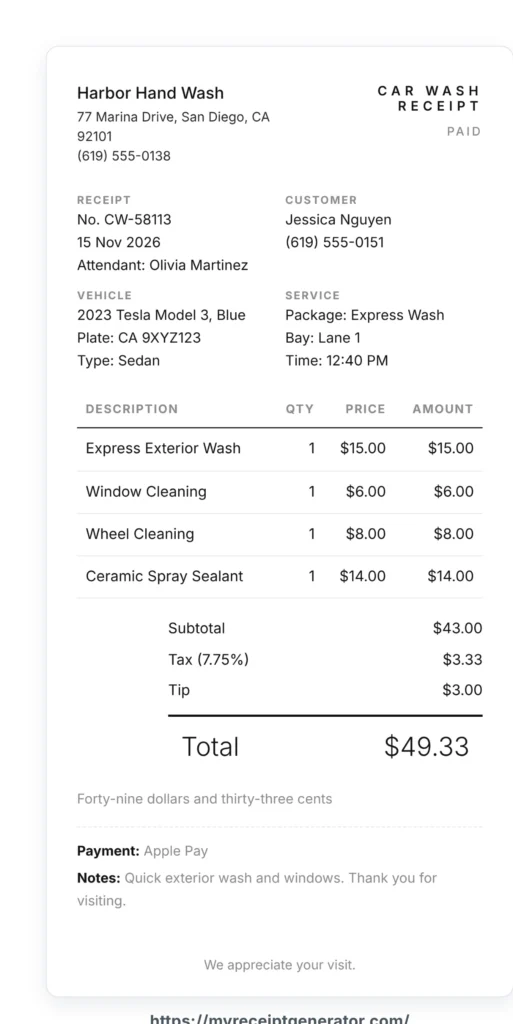
You create a car wash receipt by filling in the issue details, the vehicle and services, the charges, and the sign-off, in that order.
- Enter the service date and the Receipt # in the top right corner.
- List every job performed, then add its QTY and the Cost of one unit.
- Write the result for each row in the Line Total box.
- Add the rows, apply the rate your government requires, and record the final figure.
Take a basic sample issued on 03/04/2025 at 10:30 AM that shows one Exterior Wash at $18.00. Tax added $2.00, which brought the final line to $20.00.
Confirm that the numbers match from top to bottom before handing the receipt over. If the rows and the final line disagree, the customer will notice. In the receipt maker, the math updates as you type, so there is nothing to add up by hand. For a deeper walkthrough, read the guide to making a receipt.
How Can You Customize a Car Wash Receipt?
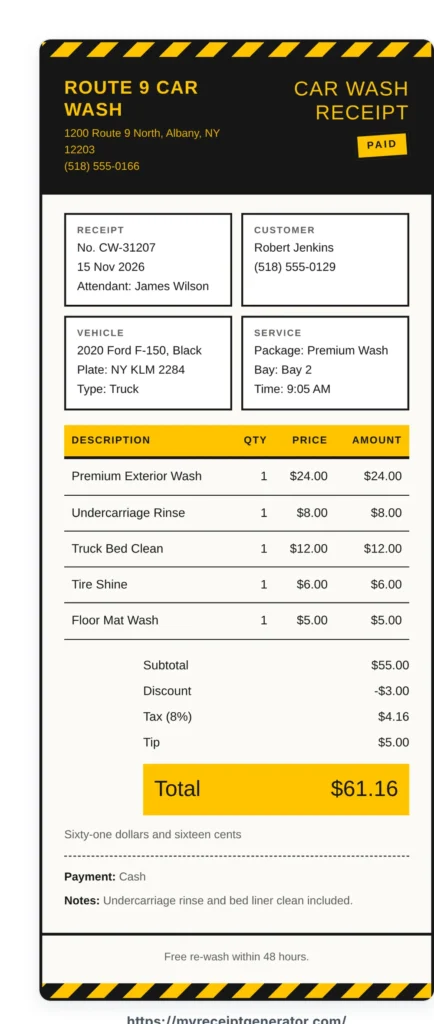
You can customize a car wash receipt by changing the shop details, the services, and the layout until the page fits your business.
Start with the shop’s details. Enter the car wash name, the street Address, a Phone number, and an Email, so customers can reach you after the visit. Those lines also help a happy customer find you again.
One sample receipt ends with a Thank You line and a barcode. Those closing touches take seconds and give the page a finished look.
Payment details can be customized too. Another sample accepted cash, check, or credit. When the layout is done, download the receipt as a PDF or PNG with no watermark.
Use customization to present real transactions clearly, never to invent them. Only issue a receipt for a payment that actually happened.
What Is a Detailing Receipt, and When Do You Need One?
A detailing receipt records additional jobs ordered after a vehicle’s basic cleaning is finished.
Any car cleaning service can end up doing more than the first order, and the paper trail should show it. A shop that adds additional services to a job without recording them invites disagreement later. When the customer picks a package type, note which package it was, so the base charge and the upgrade stay separate.
Here is a real sample, dated January 14, 2022. The work listed was interior deep cleaning and hot steam cleaning, and the bill came to £40 after tax. Two services shared one document with one final figure, which keeps the upgrade easy to follow. An itemized template like the auto service receipt maker keeps each upgrade on its own line.
Related car templates include the oil change receipt and the fuel receipt makers.
Frequently Asked Questions
Why Would Someone Need a Car Wash Receipt Generator?
Someone needs a car wash receipt when they must prove a vehicle cleaning payment for tax records or expense claims.
A driver who uses the car for business purposes may want to deduct the charge from their annual income tax return, and the receipt supports that claim. Rules differ by country. The IRS recordkeeping guide says to keep records as long as they may be needed to prove income or deductions, and the GOV.UK guide to business records covers what UK sole traders must keep. Confirm the details with an accountant. A receipt also settles arguments about taxes and prices if a charge is challenged later. Keep the paper from the day the car is washed, because memory fades fast. A generator lets a shop issue one in under two minutes, with no sign-up. The service receipt maker covers any cleaning job.
Can I Edit the Receipt Details?
Yes, you can change every detail on the receipt, from the services listed to the payment information, before you finish it.
Pick a readable font and keep the styling consistent so the page looks polished on a mobile screen. That consistency matters whether you issue receipts for personal records or for business reimbursements. If a customer later orders extra work, update the sheet to reflect what they requested, then reissue it.
What File Formats Can I Export the Receipt In?
You can export a car wash receipt as a PDF or a PNG, and the file carries no watermark.
After the Preparer fills the fields, save a copy of every receipt in your business folder, and print one only when the customer asks for paper. The receipt is built in your browser, so nothing reaches a server unless you create an account and choose to save one.
Can I Upload My Own Business Logo?
Yes, you can upload your business logo as a PNG or JPG, even on the free version.
Place the custom logo in the header, above the shop details, and keep the file small. Your browser reads the image directly, so it never reaches a server. If the logo looks stretched, edit its size and test again, then view the receipt on a mobile device, because many customers will open it there.