By Iqra Tariq
Build an oil change receipt right here in your browser. Fill in the shop, customer, vehicle, parts and labor, tax, discount, and payment details, pick one of 8 styles, and watch the receipt update live. You can add an optional QR code and Code 128 barcode, then print the receipt or download it as a PDF or PNG. Everything you type stays in your browser and is not saved to this site.
Receipt style
Shop details
Receipt
Vehicle
Parts and labor
Charges and payment
QR code and barcode
What Is an Oil Change Receipt?
An oil change receipt is a written record that a customer paid for a completed oil service on a specific vehicle. On paper it’s simple: the shop name, the customer name, the make and model, the oil and filter that went in, the labor charge, and the total.
Think of it as proof of a finished job, not a promise of one. Once it reads paid in full, anything not performed has to stay off it. A mechanic can still flag a recommendation, but keep that in a marked note, away from the total.
People hold on to these mostly for resale documentation and extended service contracts, and template guides name both. Receipt guides also treat the payment amount as a core field, with tax checked right beside it. One popular generator gets a receipt done in 3 steps, so the sections below walk through what each step needs.
What Should an Oil Change Receipt Include?
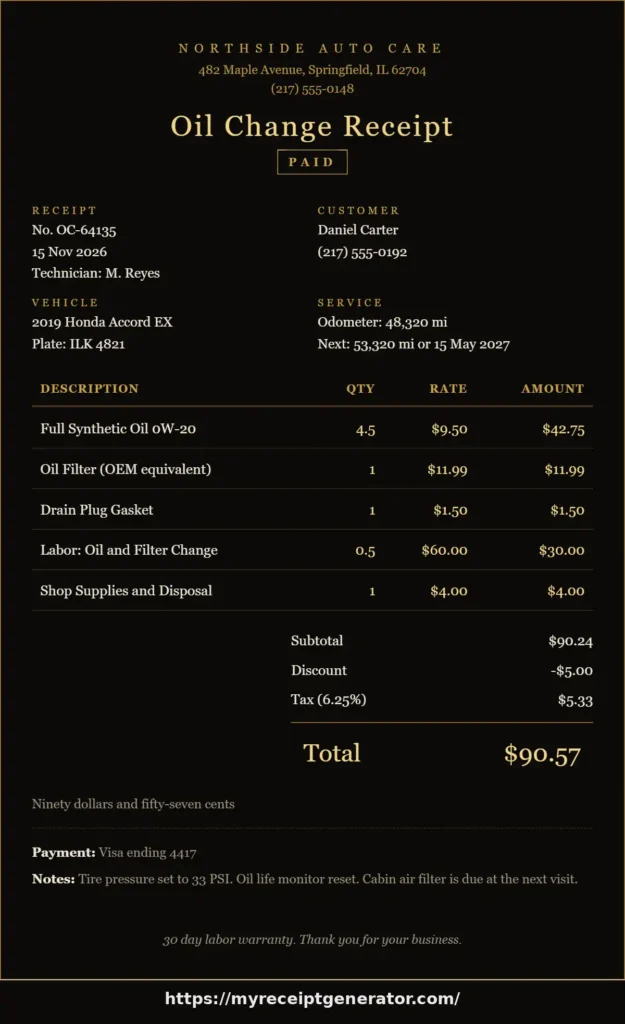
An oil change receipt should name the provider, the customer, the vehicle, the date of the work, the oil and filter used, every charge, and how the customer paid.
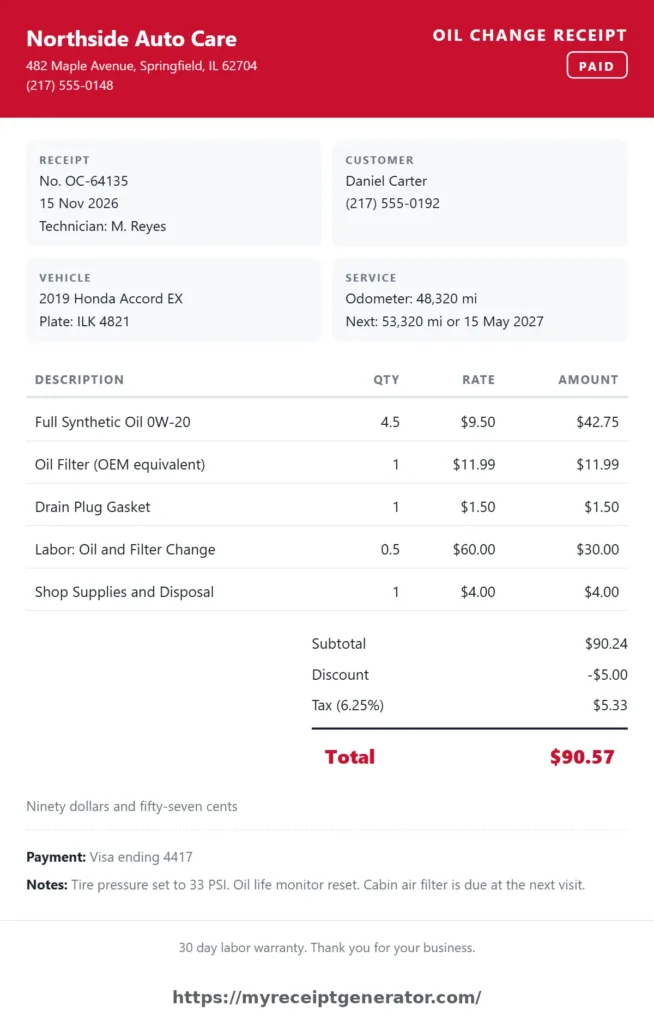
One receipt form I looked at has 7 fields: shop details, branding, customer, number and date, oil and service, payment, and visit notes. Whether the work happened at independent garages or in dealership service bays changes nothing here. You still need the technician and the shop’s contact details in the header.
Don’t rush the oil line. One template guide notes that most vehicle warranties require documented oil changes using manufacturer-approved oil, so write down the oil brand and type. It pays off for the shop too, because the same record feeds inventory tracking and labor accounting. If the job covers more than oil, a general service receipt is the better fit.
Fleet work adds three fields. A Fleet Oil Change Receipt carries them so the fleet maintenance records stay traceable:
- Driver ID: names who brought the vehicle in.
- Vehicle unit number: matches the receipt to one specific vehicle in the fleet.
- Billing account: ties the charge to the right company account.
How Do You Create an Oil Change Receipt Step by Step?
To create an oil change receipt, start from the work order, list what was charged, and record the payment actually received.
Start with a base template. A Quick Lube Standard Receipt keeps it short for busy bays, while a Dealership Service Receipt has room for more reference fields. Either one works if the receipt lists only what the customer paid for. The tool above can give you a starting layout too.
- Enter the shop’s address and phone number in the header.
- Use sequential numbering so each receipt can be cross-referenced with your invoices.
- List the charged rows: the oil, the filter, and the service itself.
- Show quantity and unit price for the oil. Five units at $8.50 gives $42.50, and a clear unit beside the quantity removes any doubt.
- Add extras on their own lines only when the customer paid for them.
- Record the card payment, add sales tax where it applies, and check the total against the original job before sending.
I like this order because the payment and the job get checked against each other before the receipt leaves your hands.
What Does the Price on an Oil Change Receipt Cover?
The price on an oil change receipt covers the oil, the filter, the service charge, and any tax or fees the shop actually billed.
Give every charge its own entry in the line items, and measure oil in quarts or liters. Match the wording to the service record for that visit. The receipt should show what happened, not what a sample receipt says happened.
Tax and fees are easy to get wrong. One worked example puts an illustrative tax on the $55.00 of oil and filter and leaves the service charge untaxed. A disposal fee or shop-supply fee only belongs on the receipt if the bill had it, and it has to respect local requirements.
Say which currency you’re using. One receipt editor offers USD, EUR, GBP, CAD, and AUD, so choose the one on the bill.
What Belongs in the Notes Section of an Oil Change Receipt?
The notes section of an oil change receipt should hold a vehicle reference, the odometer figure, the oil used, and anything that helps the customer find the visit later.
Add the license plate or another vehicle identifier, then log the mileage reading from the day of the work. Label the unit, as one guide advises, so the number still means something when the customer looks back.

Don’t skip the payment trail. One sample receipt records a debit card, chip entry, a reference number, and an APPROVED status. Put those together, and the customer holds proof of payment that bank statements can back up later.
Keep any inspection notes and the oil grade in line with the original bill. A note that contradicts the bill invites questions you don’t want to answer later.
Should an Oil Change Receipt List Each Charge or One Combined Price?
An oil change receipt can show each charge on its own row or one combined price, and the choice should mirror how the shop billed the visit.
A standalone receipt can go either way, as long as it matches the bill. The itemized style splits out the oil, the filter, and the service. The combined style gives one agreed price. Anything separately priced still gets its own entry, and discounts should show up as a visible reduction.
| Billing style | Rows shown | Subtotal | Tax | Total |
| Itemized (sample A) | Oil, replacement oil filter at $12.50, service at $25.00 | $80.00 | $4.40 at 8% on oil and filter | $84.40 |
| Combined (sample B) | Full Synthetic Oil Change | $150 | $12 | $162 |
These two samples come from different sources, so compare the format, not the price. My take: the itemized version answers more questions by itself, while the combined version is faster to read at the counter.
Why Do Oil Change Receipts Matter for Warranty and Resale?
Oil change receipts matter because they document routine maintenance when an owner files warranty claims or sells the vehicle.
Keep your maintenance records in one place and you can rebuild a full vehicle history whenever a claim or a sale comes up. One template guide treats oil type as standard information, whether it’s conventional, synthetic, or a blend. It also ties next-service details to preventive maintenance and customer retention.
The U.S. Federal Trade Commission tells owners to keep records of routine work like oil changes: a warranty company could ask for them, and without them a claim might be denied. California’s Bureau of Automotive Repair adds that service records help show proof of warranty work or support a sale.
Some receipts go further. That guide lists the part number of the filter and the condition of the drain plug washer or gasket as useful service notes. A sample receipt from another source prints a limited warranty of 90 days or 3,000 miles, whichever comes first, on the work and parts.
Shops benefit too. That guide’s tips say recording the payment method makes bookkeeping easier at year end.
Which Oil Change Receipt Template and File Format Should You Use?
Choose the oil change receipt template that matches how your shop bills and the file format your customer can open.
One generator advertises 100+ templates across receipt types, and the auto service receipt template is only one of them. Dealership-style layouts add a VIN field, according to one template guide, while quick-service layouts stick to oil type, filter, mileage, and totals. The receipt templates hub lists every option.
File format is a separate decision. A plain document holds vehicle and service notes, and a spreadsheet gives you rows for oil quantities and separate charges. One provider offers Word, Google Docs, Excel, and Google Sheets versions of its receipt template.
When the details are final, one-click export gives you a file to email or print, and the same provider also saves a PDF. That guide’s FAQ adds that a complete receipt supports customer trust.
How Do You Keep One Oil Change Visit Separate From the Next?
You keep one oil change visit separate from the next by giving each receipt its own number, its own payment record, and its own service reference.
One worked example labels its service reference OC-217 and ties it to one set of dates. If the job already sits on an invoice, build the receipt from it so nobody retypes the service visit.
Follow this order for every job:
- Give the receipt its own receipt number.
- Record the day the shop received payment.
- Keep the work date clearly labeled as a separate field.
- Leave the original payment day alone even when the file is emailed later.
An earlier visit keeps its original dates, and each new visit starts clean. Add the shop logo and a note on next service mileage so the customer knows when to return. Another guide ties these records to regulatory compliance, so check your local rules.
Frequently Asked Questions
What Date Goes on the Receipt When the Oil Change Happened Earlier?
The payment date is the receipt date, even if the oil change happened earlier. Put the service date in the notes and label it. In one worked example the work was done on September 22 and paid for on September 24, so the receipt says September 24, 2026. One template guide suggests issuing receipts within 24 hours of payment. If a customer asks for another copy, resend the original so the date never moves.
Do Customers Need Oil Details on the Receipt?
Yes, state the oil type, because it supports warranty verification. One template guide also lists viscosity, such as Synthetic 5W-30, and the oil filter. A Synthetic Oil Change Receipt layout puts those fields up front. Another guide’s caution is worth repeating: copy the values from the job record, never from a sample.
Do I Need Separate Rows for a Fixed-Price Oil Change?
No. A fixed-price oil change needs only a single line with the package price. Describe what’s included, meaning the oil, filter, and work, so nothing gets billed twice. Additional oil gets its own line only if the package left it out. A Mobile Mechanic Oil Change receipt, according to one template guide, adds a travel charge and a site location. Whatever the total, it should show only what the payment covered.
Where Should the Vehicle Mileage Go on the Receipt?
Put mileage in the notes, next to the vehicle reference, and label it as miles or kilometers. One worked example logs 62,410 miles from the day of the service. A dealership-style layout also adds a next service reminder, so the customer knows what’s coming.
Can a Receipt Mention Advised Work That Was Not Done?
Yes, but only as a labeled note that sits outside the charges and the total. Tie any note about a future visit to the service schedule or to recorded advice from the service advisor, never to a sample. Some receipt tools let you attach a service checklist too. The receipt itself should show only what this payment bought.
Can I Reuse an Oil Change Receipt for the Next Visit?
Yes. You can duplicate a receipt, and the copy opens as a new draft. Update the date, mileage, oil details, and paid line items before you send it. If the customer only needs the same job’s paperwork again, send the existing receipt instead of making another. Some tools also show when an emailed receipt was delivered and opened.
Is Using an Oil Change Receipt Generator Legal?
Generators describe acceptable use as documenting a legitimate transaction, and they prohibit fraudulent purposes. One generator’s Terms of Service limit its templates to legitimate business, creative, and educational use. Another template page calls its sample a fictional example, says the template is not official, and warns against fabricating proof of purchase. Fill every field from actual records. For more on how generator Makers work, see the receipt generator guide. I’m not a lawyer, so check your local rules.