This free tuition fee receipt generator makes a printable tuition receipt in a few minutes. Add the school or tutor details, fill in the student and fee amounts, choose your currency, then download a PDF or an image. You do not need an account, and nothing is stamped across your receipt.
Tuition Fee Receipt Generator at a Glance
| Feature | Details |
| Price | Free |
| Login | Not needed |
| Fee lines | 8: tuition, admission, examination, library, lab, transport, hostel and miscellaneous |
| Currencies | 44, including USD, EUR, GBP, INR, PKR, BDT, CAD, AUD, AED and NGN |
| Amount in words | Yes, in English, and it follows your currency |
| Logo | Upload your own, and it stays in your browser |
| Notes | A free text line for installments and balance due |
| Download | PDF (A4) or PNG image |
| Colours | 6 presets, plus your own primary and secondary colours |
| Language | English |
| Your data | Stays in your browser |
| Phone friendly | Yes |
What Is a Tuition Receipt?
A tuition receipt is written proof that a student or sponsor paid tuition to a school, college, tutor or training provider. It shows who paid, how much, when, and which term the money covers. It confirms a payment that already happened. A tuition bill or invoice does the opposite, because it asks for money.
You will also see it called a tuition fee receipt, a tuition payment receipt or a fee payment receipt. They mean the same thing.
How to Use the Tuition Fee Receipt Generator in Five Steps
Think of the tool as a tuition receipt form that builds the finished receipt for you. This tuition receipt maker works the same way on a computer and a phone, and you can make a tuition fee receipt online in about two minutes once your details are ready.
- Add the school or tutor. Type the name, address, phone number and email. Upload a logo if you have one.
- Add the student. The receipt number and today’s date are filled in for you. Enter the student name, student ID or roll number, class or course, and the academic year.
- Choose the currency and fees. Pick your currency, then type an amount on each fee line that applies. Unused lines show as 0.
- Add payment details. Choose the payment mode, add a note such as the installment number, and type who received the payment and the name of the authority.
- Check and download. Pick your colours, read the live preview, then choose Export PDF or Export Image.
Tuition Receipt Example
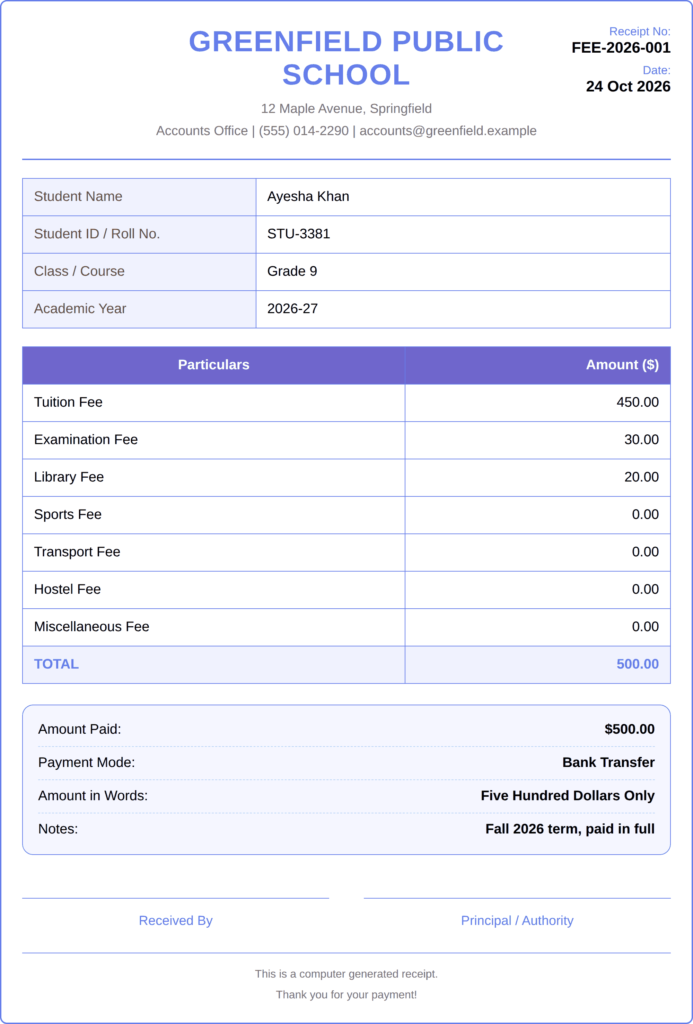
Here is a tuition receipt example for a Grade 9 student, paid in US dollars.
| Field | Entry |
| Receipt number | FEE-2026-001 |
| Student name | Ayesha Khan |
| Student ID | STU-3381 |
| Class / Course | Grade 9 |
| Academic year | 2026-27 |
| Currency | USD |
| Tuition Fee | 450.00 |
| Examination Fee | 30.00 |
| Library Fee | 20.00 |
| Total | 500.00 |
| Amount in words | Five Hundred Dollars Only |
| Payment mode | Bank Transfer |
| Notes | Fall 2026 term, paid in full |
Every charge sits on its own line, like an itemized receipt, so the parent sees exactly what the money paid for.
What a Tuition Receipt Must Include
A receipt only works if someone else can trace it. A tuition receipt with the student’s full name and date of payment is the bare minimum, but add more. Before you download, check that yours has:
- The school, college or tutor name and contact details.
- A unique receipt number.
- The date of payment.
- The student’s full name and ID, roll number or enrollment ID.
- The class, program or course.
- The academic year, semester or term the fees cover.
- A fee breakdown, with one charge per line.
- The total in figures and in words.
- The payment method, plus a transaction reference for bank transfers and cards.
- An authorized signature or stamp.
The generator has no signature pad. The receipt has two name lines, Received By and Principal / Authority, each with a signature line above it. Print the PDF, then sign or stamp it. You can read the reasons behind each item in our tuition fee receipt guide.
Tuition Receipt Template and Format for Every Case
Looking for a tuition receipt template or a tuition receipt format you can copy? The layout in the example above works for most cases. Here is how I would fill in each one.
School Tuition Receipts
Put the grade and section in Class / Course, for example, Grade 9, Section B. Fill in Tuition Fee, Examination Fee, Library Fee, and Transport Fee as they apply.
College Tuition Receipts
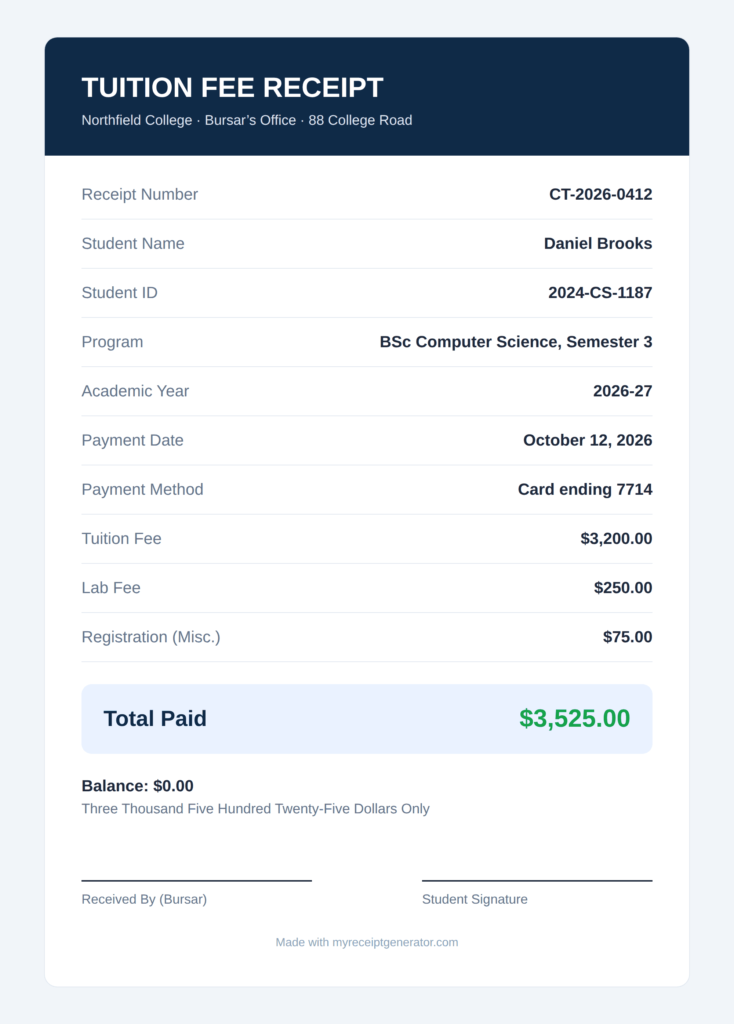
A tuition receipt for college should name the program and the semester. Type both in Class / Course, such as BSc Computer Science, Semester 3, and put the year in Academic Year. Use Lab Fee for lab charges and Miscellaneous Fee for registration or student services. This works as a college tuition receipt generator for departments, training colleges, and private institutes.
Home Tuition Receipts
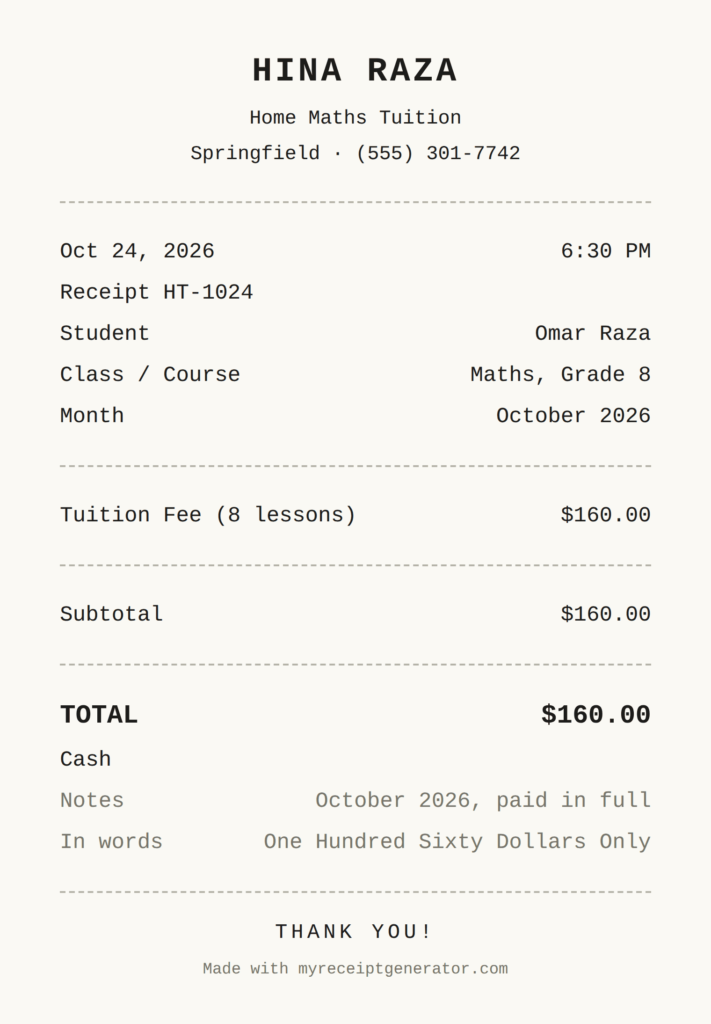
Type the tutor’s name as the institution name. Put the subject in Class / Course and the month in Notes, such as October 2026. A home tuition receipt protects both sides when a parent asks what they paid for. Tutors who work independently may also find our freelancer receipt template useful.
Daycare Tuition Receipts
There is no daycare template. Put the child’s name in Student Name, the care plan in Class / Course, such as Weekly care, 5 days, and use Tuition Fee for the care charge.
Tuition Deposit Receipts
Fill the amount in Admission Fee or Miscellaneous Fee. Write Deposit and the balance due in Notes, so the family knows what remains.
Online Course Receipts
Use the course provider’s name as the institution and the course name in Class / Course. Put the start date in Notes. For one-off lessons or coaching sessions, a service receipt may fit better.
Tuition Receipt vs Tuition Invoice vs Fee Challan
A tuition receipt confirms money that arrived. A tuition invoice or bill asks for money before it is paid, so a tuition bill receipt only makes sense after the bill is settled. A fee challan or fee voucher is the slip a parent takes to the bank, and it is a payment instruction.
| Document | When it is used | What it proves |
| Tuition invoice or tuition bill | Before payment | The amount owed |
| Fee challan or fee voucher | At the bank or payment point | How to pay |
| Tuition receipt | After payment | That the money was received |
This generator makes the last one. Do not give a parent a receipt until the payment has actually arrived.
Installments and Partial Payments
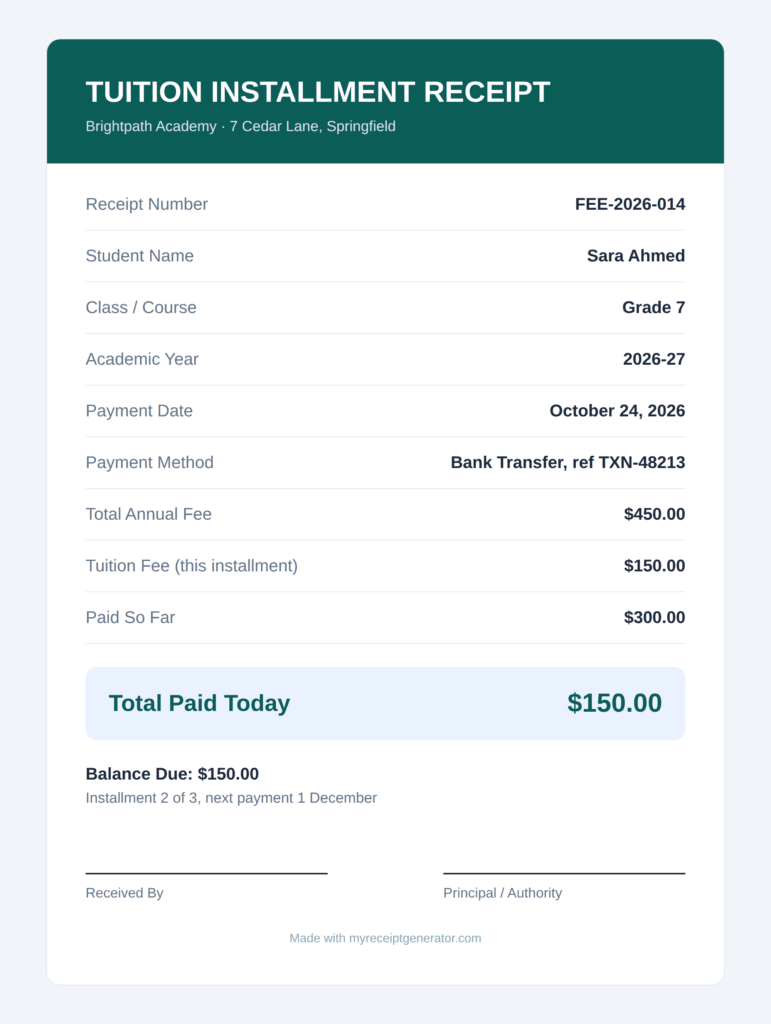
The tool has no installment field, so use the Notes field. Issue one receipt for every payment, even when the family has paid only part of the fee. Never merge two payments into one receipt, because the balance gets lost. Our payment receipt page shows the same one-receipt-per-payment approach for other kinds of payments.
Type “Installment 2 of 3, balance due 150, next payment 1 December” in Notes. That one line answers most calls to the accounts office.
Currency and Amount in Words
Choosing a Currency
Choose from 44 currencies, including dollars, euros, pounds, rupees, dirhams, naira and yen. The tool remembers your last choice in your browser. Numbers follow the currency. Yen shows no decimals, and the rupee and taka currencies of South Asia (INR, PKR, NPR, BDT and LKR) group digits in the lakh and crore style, so 1,250,000 shows as 12,50,000.
How the Amount in Words Works
The amount in words is written in English and follows the currency. A total of 1,200.50 in US dollars reads One Thousand Two Hundred Dollars and Fifty Cents Only. Lakh and crore words appear only for INR, PKR, NPR, BDT, and LKR. Other currencies use million and billion.
Because you choose the currency, the same page works for a tuition receipt in India, Bangladesh, Canada, the United States, or anywhere else on the list. Currencies outside the list are not available yet. See the ISO 4217 list for the standard codes.
Tuition Fee Receipt Download and Print
- Export PDF saves an A4 PDF with the receipt centred on the page.
- Export Image saves a PNG. It works as a tuition receipt image for chats and forms. On an iPhone, the image opens in a new tab, so press and hold it to save.
- Print from your PDF viewer. There is no print button in the tool. Print the PDF, then sign or stamp it.
- Share by attaching the saved file to an email or a WhatsApp message.
The file name uses the receipt number and the student name, so it is easy to find later. The receipt number counts up by itself after each download.
Pick the tuition fee receipt design that suits your brand. Choose one of six colour presets, or set your own primary and secondary colours. Your browser remembers your choice.
Tuition Receipt for Taxes
Rules differ by country, so check your tax authority before you file. Two examples show why.
United States
Schools report tuition on Form 1098-T. Since the 2018 tax year, Box 1 shows payments received. The form can still differ from what you paid, so keep your own receipts as well. IRS Publication 970 explains the education credits.
Canada
For a tuition receipt in Canada, look for the T2202. Designated schools issue the T2202 Tuition and Enrolment Certificate, which is the official tax receipt. Students usually get it by the end of February. The CRA tuition tax credit folio explains the rules.
A receipt made with this tool is a payment record. It does not replace a tax form from your school.
How to Get a Tuition Receipt From Your School or University
If you need an official tuition receipt, ask the school that took the payment. Here is the usual route.
- Log in to your student portal and look for the student account, financial or payments section.
- Check your email for an automatic receipt from the payment system.
- If you cannot find one, contact the bursar or accounts office. Give your student ID, the term, the amount and the payment date.
- Ask for a duplicate or reissued receipt. Allow a few working days.
Some schools only release records to the student, not to parents. Ask the student to request it, or to give written permission.
Tuition Fee Receipt Request Letter
Here is a short tuition fee receipt request letter you can copy:
Dear Accounts Office, I am writing to request a copy of my tuition fee receipt for the Fall 2026 term. My student ID is STU-3381, and I paid 450.00 on 21 October 2026 by bank transfer. Please send the receipt as a PDF to this email address. I need it for a reimbursement claim. Thank you, Ayesha Khan
When This Tool Is Not Enough
Be careful here. Only the school, college, or tutor that received the money should issue the receipt. A parent who writes a receipt for their own payment has made a note, not proof. Employers, tax offices, and sponsors expect the institution to issue it.
The same goes for student discounts and verification services. They ask for documents issued by your school, and a receipt you make yourself should not pass that check.
This tool also does not replace your accounting software. Use this tuition receipt generator for the receipt step only.
Common Tuition Receipt Mistakes
- No receipt number. Nobody can trace the payment.
- No academic year or term. The receipt does not say what the money was paid for.
- A name that differs from official records. Fix it before filing season.
- Two payments on one receipt. The balance disappears.
- A receipt changed after it was issued. Issue a corrected copy and mark the old one void.
- No currency. A bare figure is easy to misread.
Frequently Asked Questions
Is there a free tuition fee receipt generator online?
Yes. This free tuition fee receipt generator needs no login, and puts no watermark across your receipt. A small “Made with” credit line sits at the bottom.
Can I make a tuition receipt online?
Yes. This tuition receipt creator runs in your browser. Fill in the student and fee details, then download a PDF or image. It also works on a phone.
Can I use it for college tuition?
Yes. Put the program and semester in Class / Course, and use the Lab Fee and Miscellaneous Fee lines.
Can I use it for home tuition?
Yes. Type the tutor’s name as the institution, put the subject in Class / Course and the month in Notes, then share the saved file by WhatsApp or email.
Can I download a tuition fee receipt as a PDF?
Yes. Export PDF saves an A4 PDF, and Export Image saves a PNG.
Can I add my logo?
Yes. Choose an image smaller than 2 MB, and it appears in the receipt header. Your browser reads the file, and it is not sent to a server.
Does it write the amount in words?
Yes, in English. It follows your currency, for example, dollars and cents or rupees and paise.
Can I use my own currency?
You can choose from 44 currencies, including USD, EUR, GBP, INR, PKR, and AED. Currencies outside the list are not available yet.
How do I record installments?
Issue one receipt per payment, and type “Installment 2 of 3, balance due 150” in the Notes field.
Is a receipt made with this tool valid?
It is as valid as the institution that issues it. The school, college or tutor that received the payment should issue it, and sign or stamp it where its rules require.
Can I use a tuition receipt for taxes?
Often as supporting proof, but the official tax form comes from your school, such as the 1098-T in the US or the T2202 in Canada. Check your tax authority.
Can I change the fee lines?
The site sets eight lines: tuition, admission, examination, library, lab, transport, hostel, and miscellaneous. Leave unused lines blank. For anything else, use Miscellaneous Fee and describe it in Notes.
Is it available in other languages?
The form and the receipt are in English. You can type names and notes in other languages if your keyboard supports them.
Where is my data stored?
In your browser. Nothing is uploaded to our server. The tool remembers your institution details, colours, currency and receipt number so you do not retype them, and Clear All removes the saved details.
Need a Different Kind of Receipt?
This tool is for school, college, tutor, and course payments. Looking for another kind of receipt? Browse our receipt generators, try the general receipt maker, or read the receipt generator guide if you want the rules before you start. You can also start from the MyReceiptGenerator homepage.