An online order receipt is a digital document that confirms payment for an order placed online. It lists the seller, buyer, purchased items, prices, taxes, total paid, payment method, and a unique transaction ID, so it works as proof of purchase for returns, refunds, and tax records.
An online order receipt is often the only thing standing between a customer and a denied claim. Most refunds I’ve seen rejected came down to one missing transaction ID, because that proof links the payment made to the order recorded before customer service steps in.
After years of building receipts for freelancers and small shops, I’ve noticed human error hides in the itemized lines: a wrong unit price, skipped taxes, or discounts applied twice. A clean payment summary with a clear grand total catches that mismatch early.
That’s why I prefer a free online receipt generator with no account required. Pick a template, add your logo and business details, check the live preview, then download a PDF your buyer can store for returns or tax compliance.
What an Order Receipt Includes (Key Elements)
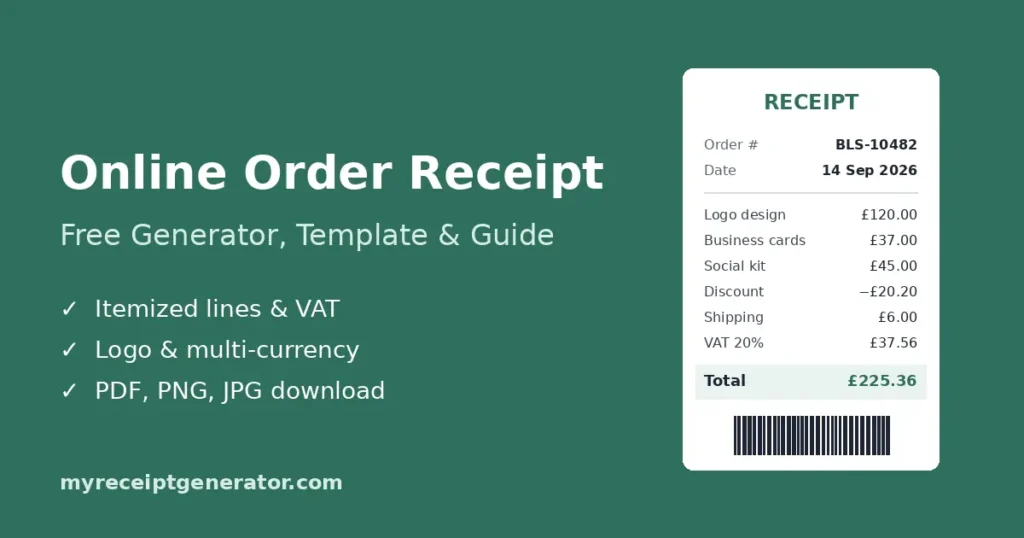
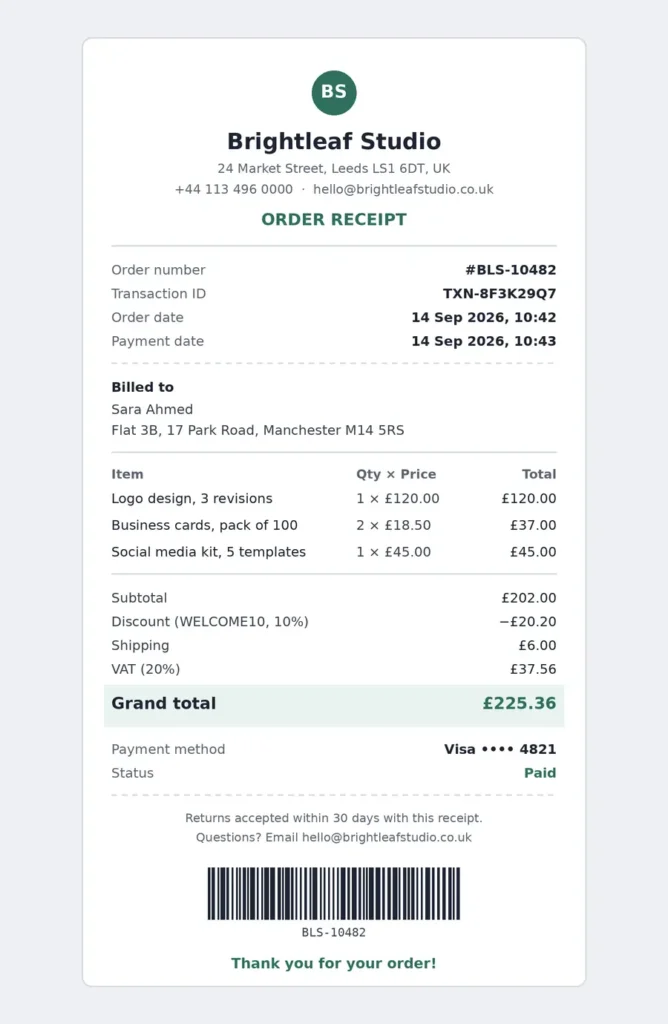
Every online order receipt that holds up in disputes carries the same key elements. Miss one, and it stops working as an official record.
1. Seller and Buyer Details
A receipt works only when both sides of the sale are identifiable.
- Seller Details: Your seller details include your trading name, address, and contact information, so customers know where to send returns and follow-ups.
- Buyer Details: Buyer details cover full names and billing or shipping addresses.
- Why Accuracy Matters: Most delivery issues I’ve traced back started with a missing apartment or house number.
2. Date and Transaction ID
These two fields turn a receipt from a slip of paper into a traceable record.
- Date: The date of purchase ties the receipt to a tax period and a return window.
- Date and Time: The date and time the receipt was issued, plus the order date if they differ. Both help customers track purchases and match the receipt to a bank entry.
- Transaction ID: A unique ID that identifies each order, so tracking a shipment or answering a support ticket becomes a quick lookup.
- Why the Order Number Matters: The order number links the receipt back to your sales records in seconds.
- Audit Trail: During audits, sequential IDs show that no receipts were skipped or deleted.
3. Itemized Line Items
The order details block is where most receipt confusion starts. I’ve seen correct bills get disputed because nobody could tell what was actually bought.
- Clear Descriptions: Write clear descriptions for products and services alike. “Logo design, 3 revisions” beats “design work.” Specific labels head off doubts early.
- Quantity and Unit Price: Place the quantity beside the unit price so the math is visible. A line showing 4 × $12.50 is easier to verify than a lone $50.
- Total Value: The total value per line should equal quantity times unit price. When every line checks out on the order receipt itself, disputes rarely reach your inbox.
4. Payment Information
Customers check against their bank statements and card statements at month-end, so your payment information has to match line for line.
- Item Cost: Start with the base item cost before anything is added or removed.
- Discounts and Shipping: Show discounts as negative lines and shipping as a separate charge. Never fold either into product prices.
- Taxes: List taxes on their own line with the rate, for example, VAT at 20%.
- Final Amount Paid: The final amount paid must equal the bank charge exactly. Even a small rounding gap is enough to trigger a customer query.
- Order of Lines: Start with the subtotal, then subtract discounts, add taxes, and end with the grand total.
- Payment Record: Record the payment method and payment date. For bank transfers, the payment date can differ from the order date.
5. Payment Method
Card, cash, bank transfer, or wallet. Stating the payment method acts as payment confirmation and helps customers verify payments. For cards, show only the last four digits.
6. Terms and Notes
This section answers questions before customers have to ask them.
- Policies: Add a short return policy, the warranty period, and any payment terms.
- Support: Include contact instructions for post-sale questions.
- Length: Keep notes to two or three lines. Customers rarely read more.
- Optional Barcode and Message Sections: An optional barcode makes lookups faster, and message sections hold store policies or thank-you notes. Turn on or off each to keep the layout clean.
- Custom Fields: A customizable template lets you add fields your trade needs.
Types of Order Receipts
The types of order receipts fall into two groups: paper styles and digital styles.
- Paper Styles: These include cash register receipts, supermarket receipts, and shop receipts, usually printed on thermal rolls with barcodes for returns.
- Digital Styles: An online order confirmation email or a downloadable digital receipt in printable formats.
Digital Receipts
For online purchases, digital receipts are now the default.
- Delivery Channels: They arrive by email or SMS, or display on the payment page right after checkout.
- Automation: You can automate sending, so every order gets a receipt without manual work.
- Easy Retrieval: Customers can search their inbox instead of digging through a drawer.
Physical (Printed) Receipts
Physical stores still hand out printed receipts at the counter.
- Same Purpose: Physical receipts serve the same purpose as digital ones: proof of what was bought and paid.
- Main Weakness: They are easy to lose, and heat, light, and moisture damage thermal paper until the text fades.
- Practical Tip: Photograph or scan important ones, such as receipts for electronics or warranty items.
How to Create an Order Receipt
You can create an order receipt in three steps with no account, and it is free to use.
- Choose a Template: Choose a template that matches your business type.
- Customize: Customize the fields, branding, and line items.
- Download: Download the receipt and send it to your customer.
Clean Template
A clean template is faster to read and easier to scale.
- Layout Basics: Use a simple layout, generous spacing, and consistent fonts, no more than two.
- What to Avoid: Skip photos. They print blurry on thermal printers and increase file size.
- Scaling Up: If you are issuing receipts in bulk, a fixed structure makes automation reliable.
Order Receipt Templates & Design Features
Good order receipt templates pair template design styles with industry-specific designs.
- Industry Templates: Ready-made options exist for a restaurant, coffee shop, matcha café, laundry service, or organic vegetable store.
- Design Features: The tools below control how the receipt is built and exported.
Drag & Drop Builder
A drag & drop builder gives you control without code.
- Flexible Structure: You can add, remove, or reorder receipt sections to fit your workflow.
Real-time Preview
Real-time preview shows changes as you make them.
- Live Editing: Every edit appears live, so you catch errors before exporting.
Multiple Export Formats
Multiple export formats cover printing, email, and web use.
- Format Options: Download as PDF for printing and email, PNG for sharp on-screen text, or JPG for the smallest file size.
Custom Styling
Custom styling keeps receipts on-brand.
- Style Controls: Adjust fonts, paper style, and receipt width. Narrow widths suit 80mm thermal printers.
Barcode & QR Support
Scannable codes make receipts easier to look up later.
- Code Options: Add a barcode or QR code with custom values, such as an order ID or a link to your returns page.
- Placement: Place them in the footer sections so they don’t crowd the line items.
Purpose of an Order Receipt
The core purpose of a receipt is to prove payment and record what was ordered.
- Delivery Checks: Customers confirm the quantity at delivery against the receipt.
- Returns and Exchanges: Stores process exchanges faster when the receipt is on hand.
- Resolving Disputes: A clear receipt answers most questions and speeds up settling issues.
Things to Note About Order Receipts
Small errors on receipts create big problems later.
- Accuracy: Review prices, discounts, taxes, fees, amounts, and descriptions before sending. Accuracy protects your credibility.
- Manual Entry Risk: Research by Raymond Panko found that around 88% of spreadsheets contain errors. Human error and data-entry mistakes like these are why automation helps.
- Data Security: Digital receipts often carry payment details, so mask card numbers and protect files against breaches.
- Record-Keeping: Secure record-keeping and organized storage make tax season far easier.
- Compliance: Local legal requirements decide which fields count toward tax compliance, so check your country’s rules.
Practical Uses of an Online Order Receipt Template
An online order receipt template is useful beyond everyday sales.
- Expense Records: Record a business purchase, personal purchase, or general expenses in one consistent format.
- Branding: Apply your logo and brand colors for consistent branding across client deliverables.
- Training: Sample receipts work well as training examples for new teammates.
- Pitching: Show a finished layout with realistic line items in proposals and presentations.
How to Get a Receipt for an Online Order
If you bought something online and need the receipt, you can usually find or request it in a few minutes.
- Check Your Order Confirmation Email: Search your inbox and spam folder for the store name, the word “order,” or the order number. Most online stores send the receipt or order confirmation right after checkout.
- Open Your Account Order History: On marketplaces and online stores, go to your account’s orders section and open the order. Many stores, including Amazon, offer a printable invoice or receipt link there.
- Check Your Payment Provider: Wallets like PayPal show transaction details, including the merchant, amount, date, and transaction ID, which can support a refund or expense claim.
- Contact the Seller: If you can’t find it, email customer support with your order number, purchase date, and the email used at checkout, and ask them to resend the receipt.
- Don’t Rely on a Bank Statement Alone: A bank or card statement shows the payment, but not the itemized products, tax, or seller details. Most returns, warranty claims, and expense reports need the actual receipt.
If you are the seller and a customer asks for a copy, you can recreate it in the free receipt generator using the original order number and transaction ID.
Frequently Asked Questions
Is an Order Receipt the Same as an Invoice or Sales Invoice?
No. An invoice or sales invoice is a request for payment sent before payment, usually with payment terms like Net 30. An order receipt confirms payment made for products or services.
Can I Customize an Order Receipt Template?
Yes. You can customize an order receipt template’s layout, styling, company details, items, tax, and payment info, then download it. Many e-commerce tools and invoicing tools offer this too, but often only with a subscription.
How Can I Create an Order Receipt Online for Free?
Open a free online receipt generator and use its builder. Enter your business name, customer details, date, amount, and payment method. Customize the template, check the preview, and download the finished receipt in seconds. It’s a free option many small businesses and freelancers rely on.
How Long Should I Keep Order Receipts?
For personal use, keep receipts until the return period or warranty period ends. For business purposes, tax rules apply. UK limited companies must keep records for six years from the end of the financial year, while the IRS generally requires three years. Check your local rules.
What Details Does an Online Order Receipt Include?
A standard receipt includes business info, date and time, itemized products, tax, totals, and the payment method. Many templates also offer message sections and an optional barcode.
What File Formats Can I Export?
You can export receipts in three file formats: PDF, PNG, and JPG. PDF is best for printing and email. PNG keeps text sharp on screen, and JPG produces the smallest file.
Do I Need an Account to Start?
No. You can start creating receipts right away. No sign-up or account is needed, and the tool is completely free.