A restaurant receipt is an itemized record of a dining transaction that lists each food and drink item, its price, the subtotal, tax, tip, and total, along with the restaurant name, date, time, server, and table number. You can create one for free on MyReceiptGenerator with no sign-up and download it as a PDF, PNG, or JPEG.
Most people searching for a restaurant receipt don’t need stock photos, vectors, or royalty-free stock images of a crumpled bill. They need a real, editable document showing menu items, tax, a tip line, and server info that holds up on paper.
Our receipt templates are shaped around how restaurants, cafes, and other food service businesses actually print checks. You can customize each field, then download a PDF or PNG in seconds, with no sign-up standing between you and the finished page.
The free receipt generator also works well for designers building mockups or video scenes that need a believable prop. Still, its main job is simple: producing professional receipts that look professional because every line reflects a real meal.
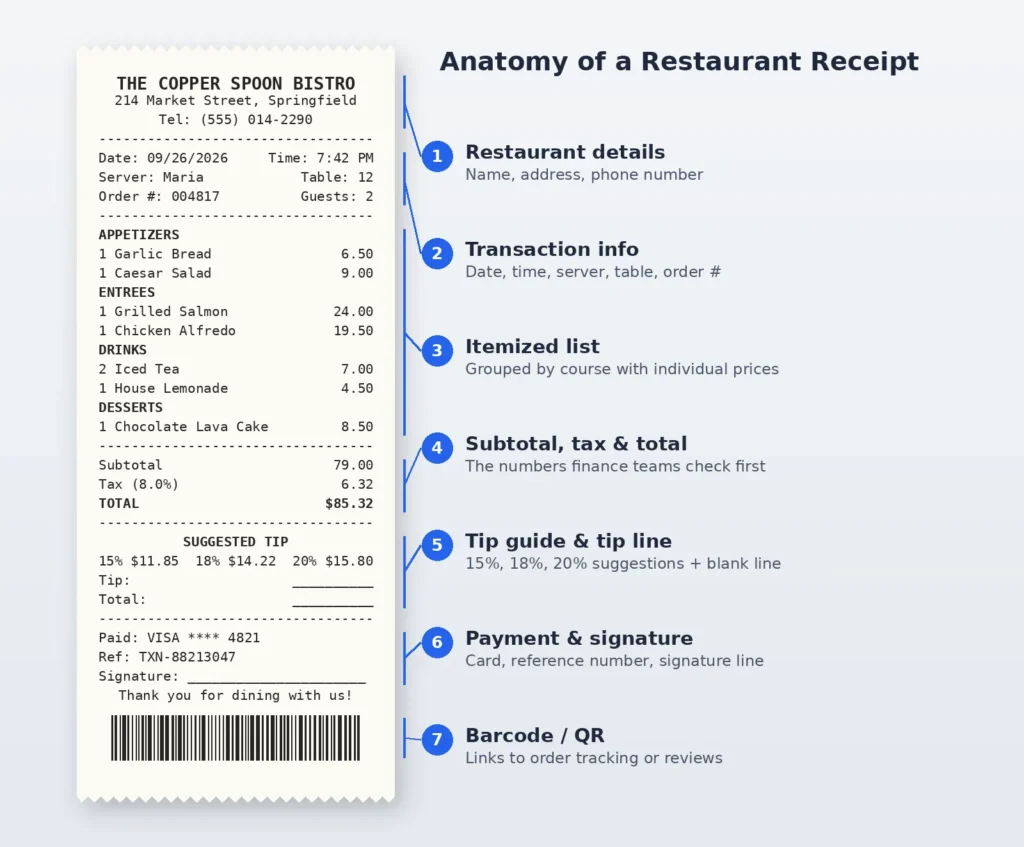
What Is a Restaurant Receipt?
Before POS terminals, a waiter’s carbon-copy guest check did the same work a restaurant receipt does now. It is a detailed record of one dining transaction, listing every food and beverage item alongside its prices, running subtotals, and applicable taxes.
What separates it from a bank statement is the breakdown. A statement only shows the total amount charged. An itemized receipt shows appetizers, entrees, drinks, and desserts line by line, plus the establishment name, table number, and server name.
Tips complicate things. Many American receipts now print a tip line with suggested gratuity percentages already calculated. If you want to check the math before printing, our tip calculator works out 15%, 18%, or 20% in one step.
When Would You Need a Restaurant Receipt?
The least obvious reason to keep restaurant receipts is billing disputes. A double charge from a busy Friday service is easy to challenge when you hold the itemized copy and nearly impossible when you don’t.
Work is the common case. Companies need itemized dining receipts to reimburse employees through expense reports, and they sit alongside other business receipts in most filing systems. Self-employed people, who often also issue a freelancer receipt to clients, need them to claim deductible business meals.
One correction worth making: in the US, business entertainment is no longer deductible, while business meals generally stay 50% deductible, according to IRS Publication 463. On the personal side, receipts support personal budgeting and help track dietary spending patterns.
What Fields Matter Most on a Restaurant Receipt?
Finance teams rarely reject a receipt for looking plain. They reject it for missing the date, the time, or an itemized food and beverage list with individual prices. Those fields prove the meal happened and what it cost.
Next comes the money chain: subtotal, tax, tip line, and total. Our sales tax calculator helps get the tax line right. After that come the payment method and a transaction reference that matches the card statement.
Identity details sit at the top: restaurant name, address, and phone number, with server name and table number beneath. Tip suggestions at 15%, 18%, and 20% are optional, but guests appreciate not doing mental math.
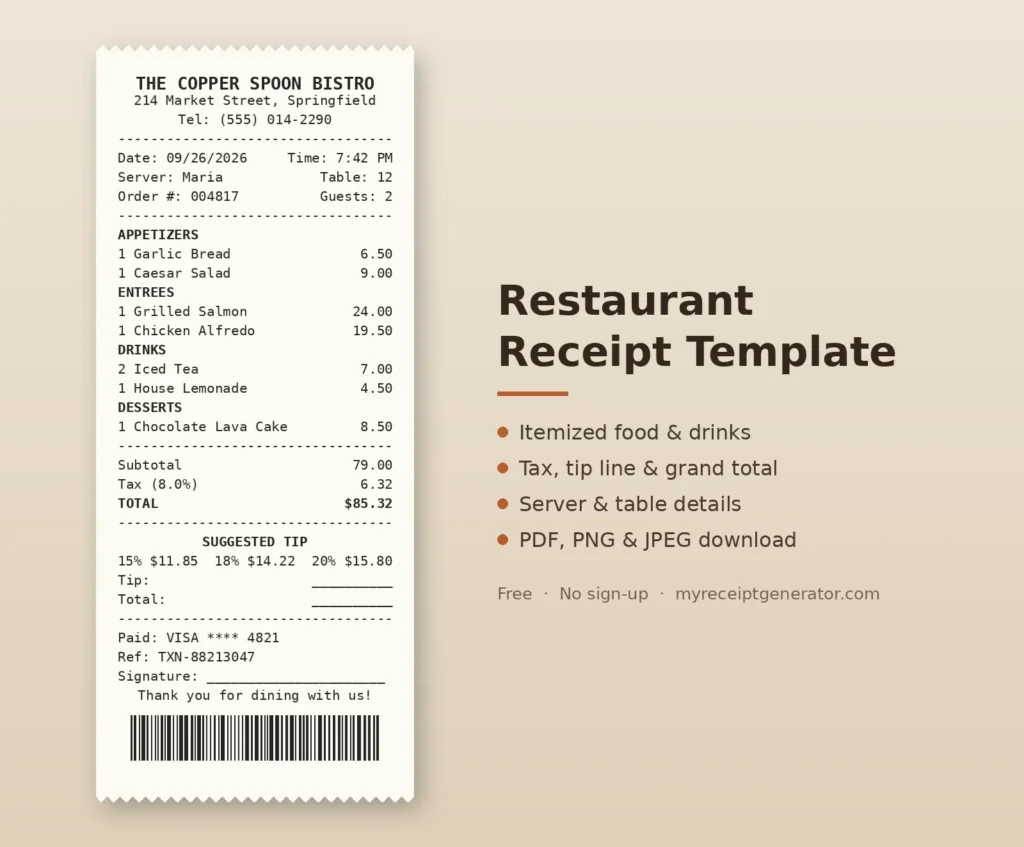
How to Create and Use a Restaurant Receipt
Start by picking a template close to your menu style, then customize the header with your restaurant name. The drag-and-drop builder lets you move blocks around, and the real-time preview updates as you type, so mistakes show instantly.
Add menu items in the order they reached the table: appetizers, then dishes from the mains, then drinks and desserts. Enter prices carefully and fill in server information like the server name and table number. The finished receipt then mirrors traditional guest checks.
For restaurants, barcode and QR code support earn their space. A QR code can link to order tracking, a page collecting reviews, or your reservation system. That turns a slip of paper into a small marketing channel.
Choose between paper styles before you download. Thermal paper looks authentic and familiar, while plain white gives a cleaner presentation. Pick the format by purpose: PDF for expense reports and records, PNG for social sharing, JPEG for quick emailing.
What You Can Do With a Restaurant Receipt
Designers get more out of this than you’d expect. They build menu design mockups, screens for a restaurant app, and website designs that need a realistic receipt instead of lorem ipsum. A generated one looks right at any scale.
For business meal expenses, it helps organize records of client dinners and team meals submitted for company reimbursement. Freelancers filing IRS Schedule C deductions use the same records to support tax deductions. Keep in mind that pure business entertainment no longer qualifies.
Inside restaurant operations, small venues without a full POS system print guest checks from it. Caterers keep catering records for catering orders, often paired with invoice templates, and planners log event dining expenses so the final invoice has itemized backup.
At home, the use is quieter but steady. Recording dining expenses for personal budgeting makes monthly food spending visible. Seeing that number in black and white usually changes habits faster than any app notification.
Getting the Details Right
Small details carry the realism. Put the server name and table number inside the transaction info section rather than floating in the header, because that’s where most ticket printers place them.
Group items by course: appetizers, entrees, beverages, desserts. Use the custom message section for tip guide percentages or a thank-you note. Add a signature line for card payments, matching standard credit card receipts.
One honest caveat from working with receipt tools: realism should never become fabrication. A generated receipt is for documenting a genuine purchase, rebuilding your own records of a real meal, or design work. It should never be used to invent expenses.
Export and File Formats
Each export option solves a different problem. PDF produces print-ready documents that keep their alignment on any printer, and it’s what most accounting software and finance teams prefer to receive.
PNG gives high-quality images with crisp text, which suits mockups and presentations. JPEG creates compressed images with smaller file sizes. That helps when you download receipts in bulk or send them through chat apps with upload limits.
FAQs
Can I Add a Tip Line to the Restaurant Receipt?
Yes. Add a tip guide with suggested percentages through the custom message section, or leave a tip blank line above the signature line. That is how most restaurant checks handle a tip line for card payments.
How Do I Itemize Food and Drinks Separately?
List food first in the items list section using descriptive names like “Grilled Salmon” rather than “Main.” Then insert a divider section for visual separation before your beverage items, so you itemize meals and drinks cleanly.
Can I Include Server and Table Information?
Yes. The transaction info section holds the server name, table number, and order number. Anything extra, such as a shift note or party size, fits neatly in the custom message section.
Can I Make a Receipt for a Lost Restaurant Bill?
You can rebuild your own record with the exact amounts, date, and restaurant details. For reimbursement, ask the restaurant for a duplicate first, or follow your employer’s missing-receipt policy, which often requires a signed statement instead.
Do Restaurant Receipts Need a Tax ID?
It depends on the country. In VAT or GST regions, registered restaurants usually must print their tax registration number, and our VAT/GST calculator handles the math. US receipts typically don’t require one.
What’s the Difference Between a Guest Check and a Receipt?
A guest check is the itemized bill the server brings before you pay. A receipt confirms payment, adding the payment method, transaction reference, and any tip, which is why expense reports ask for the receipt.
Is the Tool Free to Use?
Yes. You can build and customize receipts for free with no sign-up, and exports come watermark-free. Extras like saved receipts may be offered under a Pro option. Our step-by-step receipt guide walks through every field.
What File Formats Can I Export?
You can export as PDF for print-ready documents, PNG for high-quality images, or JPEG for compressed images with smaller file sizes. For expense submissions, PDF is almost always the safest choice.