Every time goods change hands, one habit protects the sale: a clear record of the transfer. A delivery receipt is proof that a product or service moved from sender to recipient, and a free delivery receipt maker turns that record into a professional slip in under a minute. It is the document you point to when an order gets questioned weeks later.
Without one, disputes come down to memory, and memory rarely wins. A signed slip settles the question in seconds.
You don’t need to build one by hand. Open the delivery receipt generator, enter your customer’s billing details, and download a professional receipt as a PDF or PNG. The tool fills in the receipt number, item description, quantity, unit price, and total, and calculates the bill automatically, so there is no arithmetic to check.
Create your delivery receipt now for free, no sign-up. Enter your billing details, itemize the goods delivered, add signatures, and download a clean PDF or PNG in seconds.
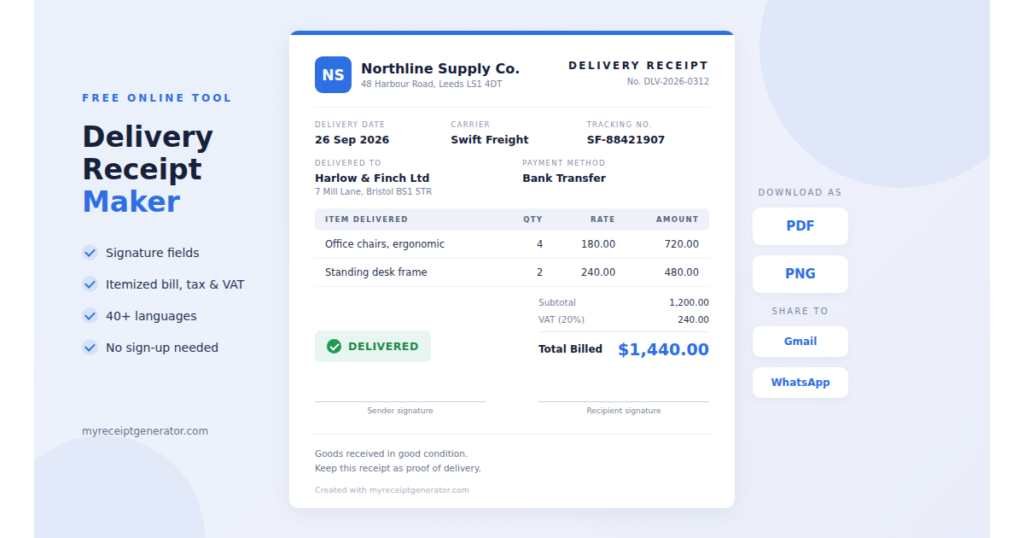
What Is a Delivery Receipt?
A delivery receipt is a document confirming that goods or services were delivered and received by the recipient. It closes a handoff: the moment a sender passes something to a receiver and both sides agree it is done.
Its strength is the structured layout. A clean slip lists the items delivered, shows the amount billed, leaves room for signatures, and records the exchange at the exact point it happens. That signed line is what later stands as proof of delivery if memory fails.
Why Use a Delivery Receipt Maker?
A signed slip is your strongest proof of delivery. When a shipment is questioned, the exact record from your delivery receipt maker lets you resolve the dispute in minutes instead of arguing from memory.
It also builds good habits. Documenting the items delivered and the amount billed at the point of handoff means nothing slips through, and a receipt completed properly holds up for legal use if a transaction is ever scrutinized. The IRS lists receipts among the supporting documents every business should keep for its records.
What Fields Should a Delivery Receipt Include?
A complete delivery receipt names both parties, itemizes what was delivered, and leaves room for signatures. The table below lists the fields to include, grouped by purpose.
| Section | Fields to Include |
| Header | Form title, receipt number, delivery date |
| Parties | Sender name and address, recipient name and billing address, contact details |
| Items | Item description, quantity, unit price, line total, discount (if any) |
| Billing | Method of payment, total amount billed, amount paid, applicable tax or VAT |
| Shipping (if applicable) | Tracking number, carrier, package weight, pickup and delivery address, timestamps |
| Signatures | Signature of sender and recipient, date signed |
Two fields carry the most legal weight: the signatures of both parties and the recorded payment method. Together they turn a slip into evidence that holds up if a transaction is ever disputed.
One filing habit worth keeping: treat tax rates and pricing tiers as live data. Re-verify any figure with a current sales tax or VAT calculator, or against an authoritative source such as your local tax authority, before locking it in.
How to Create a Delivery Receipt Online
- Open the receipt maker and enter your core details: business name, contact details, client name, billing address, and email.
- Log the issue date beside the total amount.
- Itemize the bill of goods delivered description, quantity, and unit price, and the tool totals it for you automatically.
- Set the payment method and review the slip on screen.
- Download your finished receipt as a PDF or PNG, then share it straight to Gmail or WhatsApp.
Why the Delivery Receipt Maker Beats a Blank Page
Enter each figure once, and the delivery receipt maker carries it across the document automatically, which saves time and reduces errors. When it’s time to bill the customer, pair the delivery receipt with a matching invoice generator so your delivery record and billing document line up.
What File Formats Can I Download and How Can I Share?
Every receipt from the delivery receipt maker downloads in two formats. PDF is the default because it locks the layout and prints cleanly, the format most businesses and couriers expect for proof of delivery, with signatures and your itemized bill intact exactly as they appear on screen. PNG gives you a printable image that’s easy to drop into a chat or attach on the go.
Sharing is built in. Once your receipt is ready, send it in one tap straight to Gmail or WhatsApp no downloading, printing, or switching apps. That makes it simple to get a signed slip to your customer the moment the handoff is done.
Available in 40+ Languages
Create a delivery receipt in the language your customer reads. The generator supports 40+ languages, so you can bill international clients and hand over goods across borders without reformatting a thing. Switch the language, fill the same fields, and download a receipt that looks native to whoever receives it; field labels, dates, and currency all adjust to fit the job.
Is a Delivery Receipt Legally Acceptable?
Yes, provided it is properly completed. A slip with every required field filled and clear signatures from both parties is legally and professionally acceptable in almost any transaction. Its consistent, structured layout is what gives it standing as reliable proof of delivery rather than a scribbled note.
Get Your Free Delivery Receipt Maker
Create a receipt in seconds with a free online delivery receipt maker — no sign-up, no software to install. The same generator also handles sales receipts, business receipts, and invoices, so one tool covers most of your billing paperwork. It suits freelancers and small businesses best. Fill the fields, download in high quality as a PDF or PNG, and share it via Gmail or WhatsApp the same minute you finish. Explore the full receipt generator tool to find the right slip for every job.
Frequently Asked Questions
How does the delivery receipt maker work?
Open the free delivery receipt maker, fill in the recipient name, delivery date, billing details, and a description of items, then download the finished slip. There is nothing to build from scratch — the tool already knows what a receipt should contain and totals the bill for you.
What details are in a delivery receipt?
At minimum, the recipient name and billing address, the sender information, a description of items delivered, the amount billed, the date of delivery, and space for signatures. You can edit every field freely to match each job.
When should I use a delivery receipt generator?
Any time you send goods and need proof of delivery. The same applies in reverse: when receiving packages, a filled slip lets you confirm contents against what was promised. A signed receipt also serves as a clear acknowledgment of receipt in formal correspondence.
What formats can I download, and can I share the receipt?
Download the finished receipt as a PDF to lock the layout for printing, or as a PNG image for quick sharing. You can also send it in one tap straight to Gmail or WhatsApp; no printing required.
Can I create a delivery receipt in another language?
Yes. The delivery receipt maker supports 40+ languages, so you can bill and hand over goods to international customers with a receipt that reads naturally to them.
How can I make sure my delivery receipt looks professional?
Start from the maker rather than a blank page, fill every field, and double-check accuracy before downloading. One wrong figure undermines the whole receipt, so a quick review is worth the thirty seconds.