A payment receipt template saves you the exact headache I’m about to describe. You took the cash. Three weeks later, the client emails asking when they paid. No receipt, so you’re digging through bank statements to prove something you already know happened.
A payment receipt is the business document that closes a completed financial transaction. Proof of payment both sides can point to. Funds received, written down, done.
Every order deserves a record, whether a customer pays for goods or a client settles an invoice for services. Cash payments included. That one habit keeps financial record-keeping clean and builds accountability across all business transactions, not just the big ones.
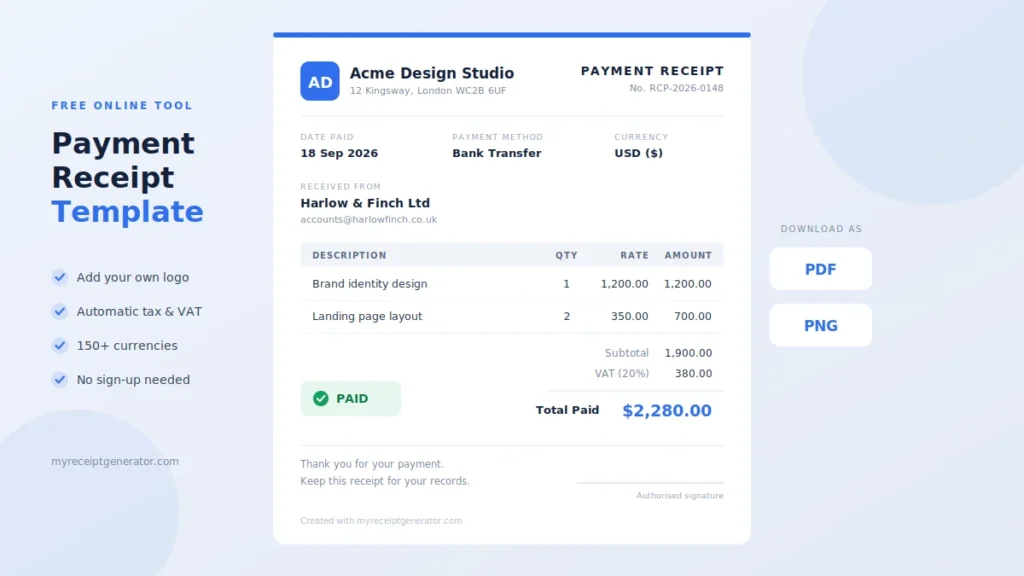
Our free online receipt generator does this in about a minute:
- Pick a customizable payment receipt template
- Fill in the payment details
- Download the PDF or send digital receipts straight to the purchaser
- Manage every document as proof
One payment receipt template covers all payment types.
What Is a Payment Receipt?
Here’s the mix-up that costs people money: an invoice and a receipt are notn’t same thivoice: A seller or service provider sends it to request payment. Money hasn’t moved yet.
- Invoice: A seller or service provider sends it to request payment. Money hasn’t moved yet.
- Payment receipt: The final document, issued once money has changed hands. The payment completion stamp.
So a payment receipt is written proof. A formal document that confirms the payment received between two parties. The client keeps one transaction record, the business keeps a copy, and both parties hold identical information about the same financial transaction.
A solid payment receipt template names the parties involved and the customer’s address, then covers the date of payment, the method used, and the exact amount paid against the overall price. Add tax details and the specifications of the purchase or services. Nothing gets left to memory.
I’ve watched clients try to reconstruct a year of payments from bank lines alone. It never works cleanly. Each payment confirmation is a record in your audit trail, and it’s an essential component of professional financial administration. A professional payment receipt template helps reduce errors, so every figure stays accurately documented when the accountant asks.
What Information Is on a Payment Receipt?
Start at the bottom, because that’s where receipts usually fail. A payee signature with a printed name, or a clear acknowledgement of receipt, is what turns a note into a record.
Who’s involved
- Business name, address, phone numbers, email addresses
- Tax registration numbers for the supplier
- Payee name and payer name, written as full names
- Purchaser information, including the customer name, so the recipient is clear
What was paid for
- Itemized description of goods, or a description of services
- Quantities and unit prices
- Line-item totals
- Subtotal, then taxes such as GST/HST or PST/QST, then the final total
Our VAT/GST calculator handles that tax math if you’d rather not do it by hand.
Payment details
- Payment method: cash, check, credit card, or bank transfer
- Amount paid and the date
- Purpose of payment
On a simple cash receipt, write the exact amount in figures. Handwritten numbers get misread more often than you’d think.
If it’s a partial payment
Include balance information: the amount due, what was paid, and the remaining balance. A short payment summary box does the job. Referencing the original invoice means the balance is never a mystery for services billed in stages.
Tracking
Give every receipt a receipt number in sequential order, plus a date of issue. Add the bank or gateway transaction number if one exists. That’s what makes internal tracking work. A contact line and a signature space close the loop.
Who Uses a Payment Receipt Template?
Wider than most people expect:
- Small and medium businesses (SMBs) use a sales receipt for customer payments on goods and services
- Freelancers and contractors issue a service receipt once an invoice is settled, as proof o.f payment for tax and accounting purposes
- Landlords give tenants a rent receipt as official acknowledgement of every rent payment received
- Hotels hand guests a hotel receipt at checkout
- Drivers issue a taxi receipt for expense claims, and lots issue a parking receipt
- Charities send a donation receipt that donors keep for their records
- Anyone selling privately. Sell a used car through cash transactions, and you still want a formal receipt
A versatile payment receipt template fits each case, whatever the business or document.
Why Businesses Use Payment Receipts
Taxes. Ask anyone who’s scrambled through tax season without a paper trail. Tax filing and income declarations run on evidence. A time-stamped transaction record is the cleanest proof of income you can hand over for tax compliance. The IRS says the same in its recordkeeping guidance for small businesses.
In Canada, break out GST/HST and PST/QST on separate lines. The Canada Revenue Agency’s GST/HST guide explains why it matters. Businesses and freelancers need those lines for accounting purposes, and the purchaser needs them for expense claims and expense tracking against a monthly budget.
Disputes. When a billing dispute starts between two parties, a sales receipt showing the payment date and full amount ends it. Dispute resolution becomes a lookup instead of an argument, and discrepancies surface early.
Installments and loans. Each payment receipt should show the current balance. The payer sees what’s left, and the balance you track matches theirs. That kind of confirmation protects your credibility.
Cash flow. Log customers’ payments as they arrive, and you get real cash flow tracking. Incoming revenue, expenses, and profits stay visible. Bookkeeping stops being a weekend chore and turns into routine financial record-keeping. Call it financial accountability.
For the other side. Your customer needs proof of payment for returns and for any warranty claim on goods or services. An organization paying a supplier files the digital receipt against each monetary transaction, which simplifies confirmation tracking. A consistent payment receipt template speeds up receipt creation on both ends.
Benefits of Using a Payment Receipt Template
Building receipts from scratch in Word is where mistakes creep in. A column shifts, a total doesn’t update, and you’ve sent a client the wrong figure.
A payment receipt template fixes the structure for you:
- Clean layout that doesn’t break
- Pre-written text you keep
- Fixed content blocks, so you only edit what changes per transaction
Doing walk-in sales? A cash receipt template works the same way. Ours is 100% free. Since every payment receipt template keeps its fields in the same spot, regular clients learn where to look for the total.
How to Make, Use, and Edit a Payment Receipt Template
A spreadsheet can technically do this. Formulas break, though, and layouts drift over time. An online platform with an editable, customizable payment receipt template gets you a formatted receipt in minutes, with no free trial countdown. Our receipt generator guide covers each field in detail.
1. Add your branding. Upload your logo, pick your brand colors, keep graphics minimal.
2. Fill in the details. Your business information and supplier information first, then the payer name and the purchaser’s contact details. People rush this part and regret it later.
3. Add the payment particulars.
- Goods or services
- The amount, as a dollar amount or your local currency
- Date of payment and the purpose
- Payment method under payment details: cash, check, or bank card
4. Generate it. Double-check the date and method, then run it through the receipt maker. The instant preview shows exactly what your client gets.
5. Deliver it.
- Download as a PDF or export it
- Print a hard copy for walk-in customers who still want paper
- Email it, drop it into WhatsApp, or share a secure link
Receipts that are electronically signed and stored in the cloud are far easier to find later. Keep a duplicate for your own record-keeping, and reuse the same payment receipt template so every professional receipt you send looks consistent.
When to Send a Payment Receipt
Same day. Within minutes if you can.
- Online payments: Email a digital copy as soon as the transaction clears
- Cash payments in person: Hand over the payment receipt before the customer leaves
- Installment payments: Send a receipt after every part of the bill is paid, not just the last one, and show the current balance each time
Old-school shops used a carbon copy book for two copies. A cash receipt template does the same job now: one for the buyer, one for your records. Wait a week, and inaccuracies creep in, because memory of the payment date fades fast.
Digital Receipts vs Paper Receipts
Paper receipts aren’t dead. Some customers want something printed in hand, and that’s fine.
But paper fades, tears, and disappears into drawers. Physical loss is the normal outcome, not the exception. A digital document survives.
Digital payment receipts are:
- Searchable, so you find one in seconds
- Shareable by email or WhatsApp
- Consistently formatted every time
- Ready as a downloadable PDF, instantly
Businesses that switched report the same operational improvements: fewer lost records, fewer “can you resend that?” emails.
Best Practices for Payment Records
- Number them sequentially. Never reuse a number. Unique receipt numbers are the backbone of accurate bookkeeping, and our invoice number generator keeps the sequence clean.
- One receipt, one transaction. Every detail on the document should match your bank statement.
- Reuse one payment receipt template so your records stay comparable month to month.
- Store them in one place for future reference. Tax authorities expect several years of records for tax purposes. The IRS lists its periods in How long should I keep records?. Check your own country’s rules rather than guessing.
Frequently Asked Questions
What Is a Payment Receipt Template?
A pre-formatted document. You enter the transaction details and get a professional receipt instantly. Our customizable templates are free, and every payment record saves as a PDF.
Is the Payment Receipt Template Free?
Yes. The payment receipt template, the PDF download, and custom branding with your logo all come free.
Plenty of generators lock things behind paid plans: email delivery, a shareable link, WhatsApp sharing, or watermark removal. Ours doesn’t. Fill it in, download it.
Can I Send Payment Receipts via WhatsApp?
Yes. Download the PDF, then send it through WhatsApp or email from your phone’s share menu. One click, near enough. The recipient can view it without installing anything.
It’s the fastest way to get receipts to clients who pay online. A “got it” reply is enough to confirm receipt, and that message stays on record.
Is a Digital Payment Receipt Legally Valid?
In most jurisdictions, yes. A digital payment receipt counts as legally valid evidence of a transaction when it shows the required fields:
- Payee and payer
- Date and amount
- Method and purpose
A signature strengthens it further. Tax-specific rules vary, so run it by your accountant.
Can I Download My Receipt as a PDF?
Yes. Every payment receipt is downloadable as a professional PDF, formatted to print cleanly on A4 or US Letter. Printing at home or in the office works the same.
Can My Client Confirm the Payment Receipt Online?
Simpler than people expect. Send the receipt and ask your client to confirm receipt by replying. Their reply means you’ve been notified it arrived.
Want a public link instead? Upload the PDF to Google Drive and share that. Keep the replies next to the PDFs, and you’ve built a digital audit trail with no extra tools.
What Information Should a Payment Receipt Include?
A complete payment receipt has:
- Receipt number and date
- Payee name and payer name
- Amount paid and payment method
- Purpose of payment
- Your contact details
- A signature or written confirmation
Cover those, and your payment receipt template holds up when someone questions it.
Can I Add My Logo to the Payment Receipt?
Yes. Upload your business logo, and it shows on every payment receipt, including PDF exports. Branded receipts read as more trustworthy.
Two tips: set a brand color that stays readable, and use a high-resolution logo file so it prints sharp instead of pixelated.
Does the Payment Receipt Template Support Multiple Currencies?
Yes. Issue a receipt in the currency your client actually paid in. Tools covering 150+ currencies make it workable for freelancers billing clients worldwide. Our sales tax calculator helps when local rates differ.
Where Are My Payment Receipts Stored?
On your own device, the moment you download them. They stay under your control.
For backup, keep them in cloud storage like Google Drive so they’re stored securely and accessible from any device. A folder per month works as a simple receipt dashboard come tax season.