Last Updated: September 16, 2026
Fill in your business details, items, and sales tax below, then download your sales receipt as a PDF or PNG.
A sales receipt is the one document that does two jobs at once. It serves as a record of sale and proof of payment in a single document, issued at the time of sale when goods or services are sold and paid for immediately.
Unlike a standard receipt, which confirms payment against a previously issued invoice, a sales receipt skips billing entirely. In retail, food service, and personal services, the customer pays on the spot, which makes it the standard transaction record and proof-of-payment every business keeps.
The best ones list products by quantity or number of items, the price per unit, and the sales tax levied by the State, county, or jurisdiction at the transaction location. A solid template lets any vendor automate proof of sales with no invoice needed.
What Should a Sales Receipt Include?
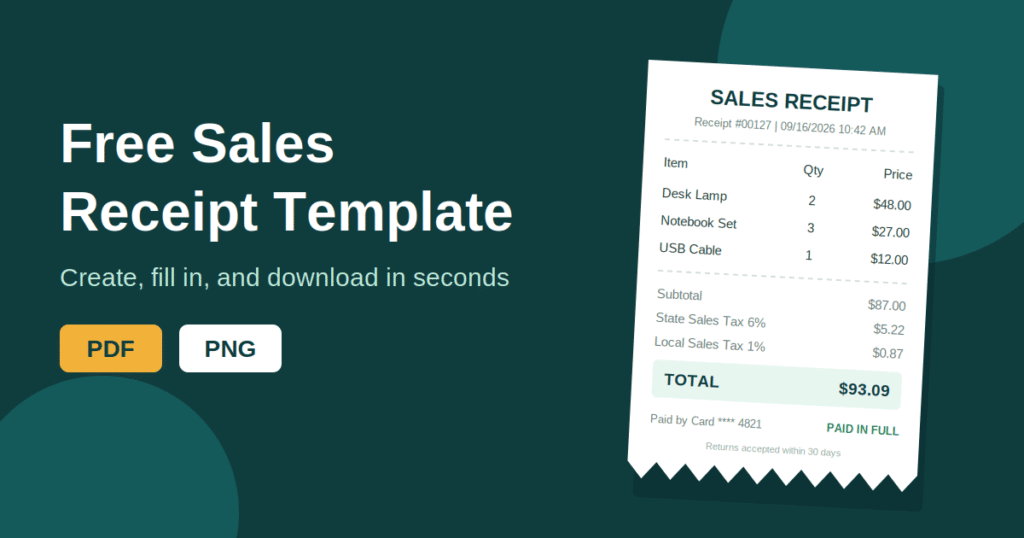
There is no federal format for sales receipts in the US. The layout requirements come from two directions. The states audit sales tax collected, and the IRS expects businesses to keep records that support the income reported on their tax returns.
When I review a client’s checkout setup, I check every complete sales receipt against this list:
- Seller block: The company name, street address, city, state, postal code, phone, and email
- Purchaser: The buyer’s name, when you have it
- Payment method: Cash, check with the check number, or credit card with the credit card type
- Line items: Item name, price, QTY, and subtotal
- Status: A note that payments are confirmed and the order is paid in full
- Sign-off: A signature line and the date
Older templates often include a card’s expiration date and full credit card number. Remove both. Under the federal FACTA truncation rule, electronically printed receipts can show no more than the last five card digits and cannot show the expiration date. Handwritten receipts are exempt, but I still recommend following the same rule on paper.
Essential Information
These eight fields are the minimum. If a receipt is missing any of them, it will cause problems during a return or an audit.
- Document label: Print “Sales Receipt” at the top. A customer who sees an invoice or estimate assumes money is still owed.
- Receipt number: A unique sequential identifier makes tracking, returns, and reconciliation much faster. Gaps in the sequence are the first thing an auditor asks about. An invoice number generator keeps your numbering consistent.
- Date and time of sale: The date anchors the transaction. Retail and food service businesses that handle hundreds of transactions per day need the time of sale as well.
- Seller details: Your business name, address, phone number, and state tax ID or sales tax permit number if you are registered to collect sales tax.
- Customer details: A “Bill to” line with the buyer’s name. It’s optional for walk-in retail sales but expected for B2B transactions and higher-value sales.
- Description of items or services sold: Spell out exactly what the customer purchased. A line that says “misc item” won’t help you in a dispute.
- Amount received: The total payment collected.
- Payment method: Cash, credit card or debit card (showing only the last four digits of the card number), check, mobile payment, or gift card.
Recommended Additional Information
These fields aren’t mandatory everywhere. In practice, they prevent most of the customer complaints I see.
| Field | What to Show | Why It Matters |
| Line Detail | Quantity and unit price | Required for itemized sales, so customers can check the math |
| Sales Tax Breakdown | Subtotal, then state sales tax and local sales tax (county, city, district) on separate lines, then the total | Many states expect each tax amount stated clearly |
| Change Given | Amount tendered and change returned | Settles register disputes in cash transactions |
| Discount Applied | The promotion, coupon, or loyalty discount, plus the original price, the discount, and the final amount | Shows the customer exactly what they saved |
| Tip Line | Suggested tip amounts for dine-in orders | Cuts math errors at the table. A tip calculator helps set the suggestions |
| Purchase Order | The P.O. number | The buyer’s accounts team matches it in B2B sales |
| Ship To Address | Delivery address | Needed when purchased items are shipped somewhere other than the billing address |
| Return and Exchange Policy | The return window and conditions | Print it plainly: “Returns accepted within 30 days with original receipt” |
When and Why Is a Sales Receipt Used?
The rule is simple. If payment and the sale happen simultaneously, you need a sales receipt, not invoicing. It gets issued as the transaction record the moment money changes hands.
- Retail: These are classic point-of-sale transactions, where a customer picks a product and pays at the counter. Examples include grocery stores, clothing shops, hardware stores, and electronics retailers.
- Food Service and Hospitality: Restaurants, cafés, bars, and hotels issue them for dine-in meals, takeout orders, and room charges settled at checkout. Hotels usually need a more detailed format, so see our hotel receipt template.
- Personal and Professional Services: Any immediate-payment service needs one. That covers personal services and professional services like haircuts, car washes, repair shops, medical co-pays, and fitness classes.
- Online: For e-commerce orders paid by credit card, PayPal, or Apple Pay, the order confirmation email replaces the physical receipt.
- Market and Trade Show Selling: This includes a trade show booth or a weekend market, plus pop-up sales at farmers’ markets, craft fairs, and pop-up shops. The buyer still deserves documented proof of purchase, even when the seller has no fixed location. A mobile receipt maker handles this well.
IRS Form 8300: Cash Payments Over $10,000
A receipt isn’t the only paperwork that large cash payments trigger. Any business that receives more than $10,000 in cash payments from a single transaction or related transactions must file IRS Form 8300 within 15 days.
Two timing rules catch owners off guard:
- Same-day splits: Payments from the same payer within 24 hours that add up to more than $10,000 count as one transaction.
- Installments: If payments on one deal push past the threshold within 12 months, you have a filing obligation from the payment that crosses the line.
The definition of cash is broader than most owners expect. It covers currency, including foreign currency. In sales of consumer durables, collectibles, and travel or entertainment, it also covers cashier’s checks, money orders, and traveler’s checks with a face value of $10,000 or less. Personal checks never count.
In retail, this rule affects vehicle sales, jewelry, and art dealers the most. Filing the form isn’t the end of it, though:
- Send a written statement to each person named on the form by January 31 of the following year.
- Keep a copy of each Form 8300 for five years.
- File electronically if your business must file at least 10 other information returns (such as W-2s and 1099s) in the year.
For everyday cash sales below the threshold, a clean cash receipt is enough.
Sales Tax on Sales Receipts
If you collect sales tax, show the tax amount separately on the receipt. Most states expect this from businesses, and a clear line item protects you when an auditor compares receipts against your returns. Run your numbers through a sales tax calculator before you print a new template.
As of 2026, five states have no state sales tax: Alaska, Delaware, Montana, New Hampshire, and Oregon. Don’t assume that means zero tax, though. Many Alaska municipalities charge local sales tax, and several Montana resort communities collect a resort tax of up to 4%. New Hampshire also taxes meals and rooms through a separate system.
Selling across multiple states changes the math. The tax rate usually follows the location of sale or the delivery address, not your home state’s rate. If you sell outside the US, VAT and GST work differently, and a VAT/GST calculator saves a lot of guesswork.
Best Practices for Sales Receipts
- Stamp the time, not just the date. Put the time of sale next to the date. For businesses with heavy transactions per day, a timestamp helps you find specific transactions during returns, disputes, and end-of-day reconciliation. A barcode on the receipt number speeds this up at the counter.
- Print the return policy on every receipt. A visible return policy on the receipt sets expectations early. In my experience, customers who can see the return window push back far less, and retailers spend less time arguing at the counter.
- Offer digital receipts, but ask first. Digital receipts sent by email and text receipts cut paper waste and capture contact information. If you want to use that information for future marketing, you need the customer’s consent first. A QR code printed on the receipt is an easy way to link to the digital copy.
- Keep copies for at least 3 years. Store copies for at least 3 years. That’s the general IRS window for records that support income after filing. Unreported income over 25% of gross income stretches it to 6 years, employment tax records need 4, and your state may set its own sales tax retention rule.
- Treat sales receipts as core documentation. For immediate-payment transactions, sales receipts are your primary documentation of revenue. Our receipt generator guide walks through setting up a system that stays audit-ready.
Sales Receipt by Type
Some purchases need extra fields on top of the standard layout. Here’s what I’d add for each type:
| Receipt Type | Extra Details to Include |
| Art | Artist, title, medium, and certificate of authenticity |
| Bike | Frame serial number, which helps with stolen property checks |
| Boat | Hull identification number (HIN) and registration number |
| Car / Vehicle | VIN, odometer reading (federal disclosure applies to model year 2011 and newer vehicles under 20 years old), and an “as-is” clause |
| Motorcycle | VIN, odometer reading, and title status |
| Cat / Kitten | Breed, date of birth, microchip ID, and vaccination record |
| Dog / Puppy | Breed, date of birth, microchip ID, vaccination record, and health guarantee terms |
| Horse | Registration papers and a current negative Coggins test, which many states require for sale or transport |
| Equipment | Make, model, serial number, and condition |
| Garage Sale | A short item list and an “as-is, no returns” note |
| Girl Scout Cookie | Number of boxes, varieties, and troop number |
| Gun / Firearm | Make, model, and serial number. Private sale laws vary by state, and many states require a licensed dealer transfer |
| Mobile Home | HUD label or serial number, title number, and home location |
Frequently Asked Questions
Is a Sales Receipt the Same as an Invoice?
No. An invoice asks for payment that is still owed. A sales receipt confirms that payment was made at the time of sale.
Does a Sales Receipt Need a Signature?
Usually not for everyday retail sales. It’s smart to get one for high-value or private sales like vehicles, animals, and equipment.
Can I Send Sales Receipts by Email Only?
Yes, as long as the digital receipt contains the same information a paper receipt would. You also need to store copies you can retrieve later.
How Long Should I Keep Sales Receipts?
Keep them for at least 3 years under general IRS guidance. Keep them 6 years if income was underreported by more than 25%, and check your state’s sales tax rules too.
Can a Sales Receipt Show My Customer’s Full Card Number?
No. Electronically printed receipts can show no more than the last five digits and cannot show the expiration date. Showing only the last four digits is the safer standard.